Webex
Designed a new agenda feature for Webex to improve meeting efficiency and productivity.
Background:
Webex is Cisco’s video-conferencing platform used by teams worldwide to collaborate and run meetings remotely.
I worked on a four-person UX team partnered with Cisco designers to explore opportunities to improve meeting effectiveness. Collaborating with a Cisco UX Manager and Sr. UX Designer, we designed a new feature focused on helping teams get more value from meetings so they could spend less time meeting and more time doing meaningful work.
My Role:
Client Liaison
Concept Development
Journey Mapping
UX Research
Usability Testing
Timeframe:
10 weeks (AUG-NOV 2023)
Stakeholders:
UX Manager, Sr. UX Designer
Customer:
Webex enterprise users who schedule and attend meetings.
Goal:
Help teams run more effective meetings and reduce unnecessary meeting time.
Problem:
Modern teams rely heavily on virtual meetings to collaborate, align, and make decisions. However, many meetings lack clear structure or shared expectations, causing discussions to drift and outcomes to remain unclear. Participants often leave meetings without alignment on next steps, leading to follow-up meetings to resolve unfinished work.
This created inefficiencies for teams, increased meeting fatigue, and reduced time available for focused work.
Outcome: Designed a meeting agenda feature that helped teams align on goals, structure discussions, and drive clearer outcomes during meetings.
Design Prompt: “How might we increase productivity and efficiency in real-time meetings, so teams can meet less and do more?”
Constraints:
Webex provided three constraints that guided our design decisions:
Rebranding the core Webex logo was out of scope.
Solutions needed to align with Webex’s existing design system.
The signature “OBTP“ (One Button to Push)- the large green join button- could not be modified or removed, as it is a key brand element.
Clarifying the Problem:
During kickoff, I worked with the stakeholders to understand what research or data could help frame the problem space for us. They shared articles outlining the human and organizational costs of virtual meetings. Reviewing these materials revealed the problem was multi-faceted:
User Problem:
Too many virtual meetings leads to fatigue and reduced productivity.
Business Problem:
Meetings are expensive! Unnecessary meetings increase operational costs and reduce organizational efficiency.
Webex Problem:
Webex trailed their competitors such as Zoom, Microsoft Teams, and Google Meet in market share- creating pressure to differentiate through improved meeting experiences.
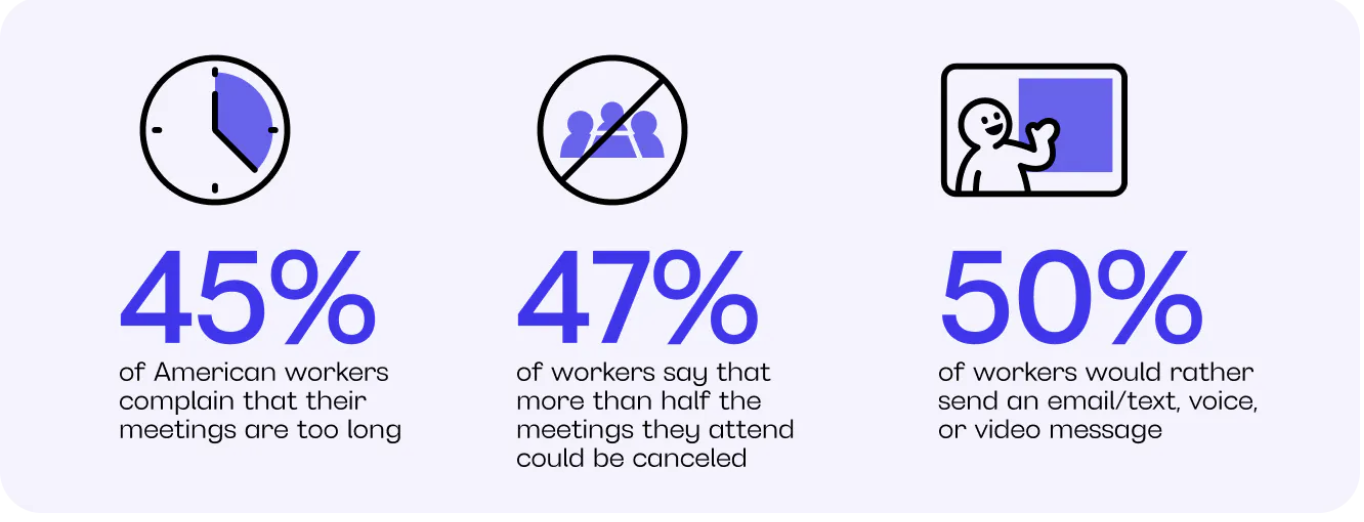
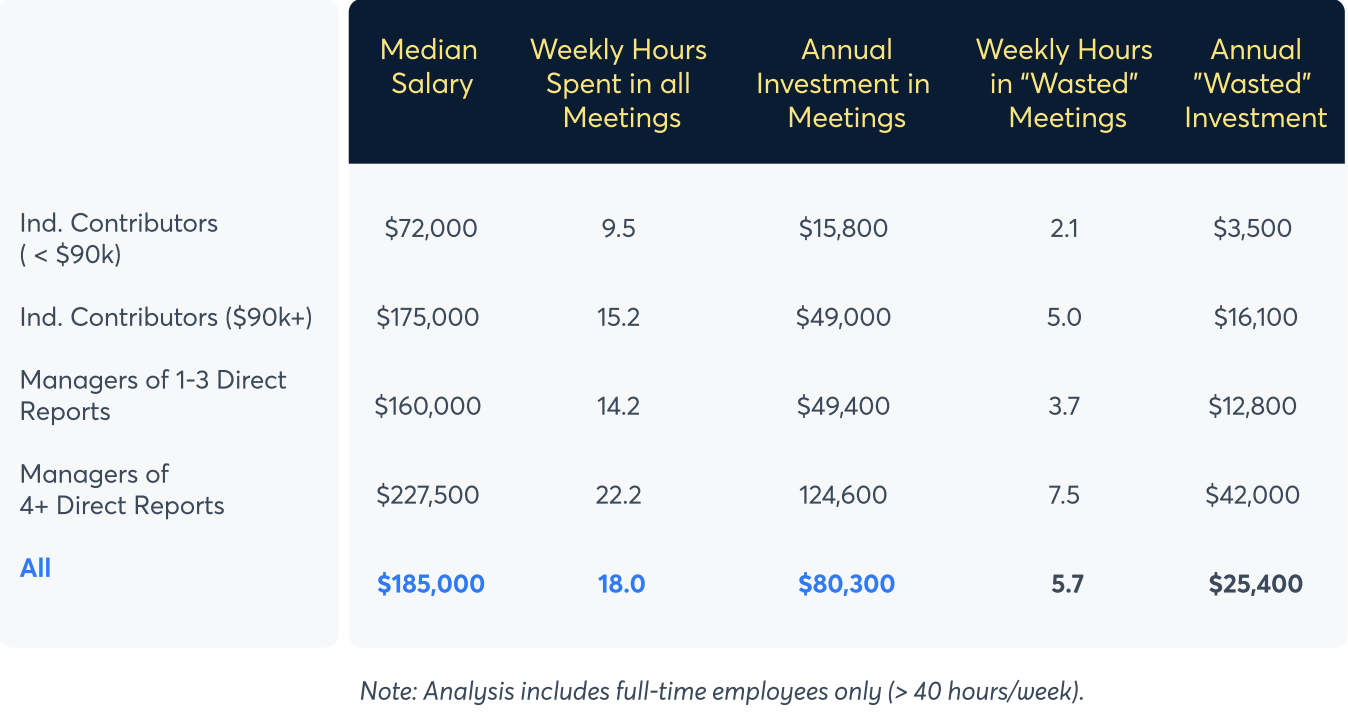
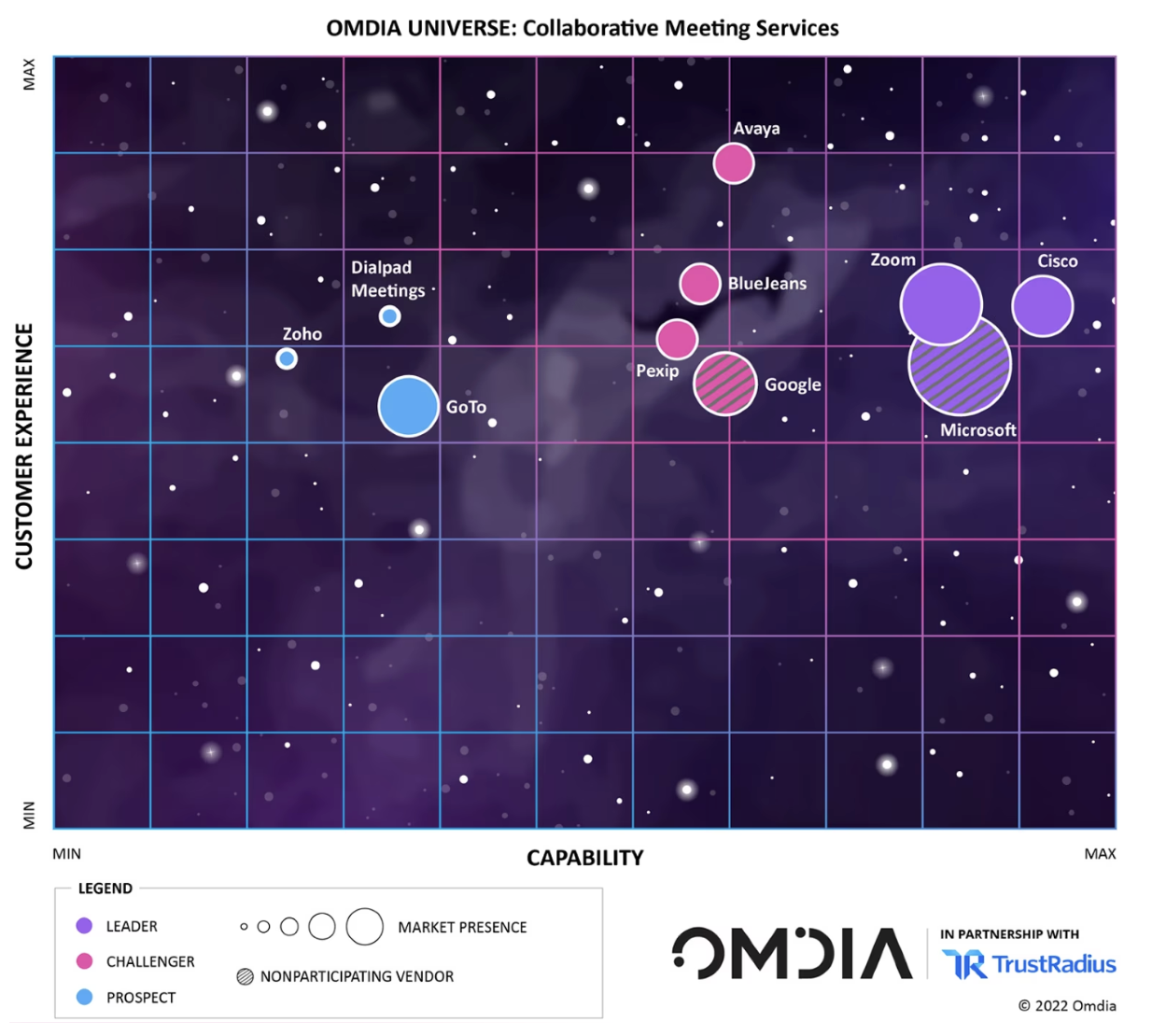
These insights reframed the opportunity: improving meeting efficiency could help organizations reduce time spent in meetings while positioning Webex as a more cost-effective collaboration platform.
This led us to refine our guiding question: How might we reduce both meeting frequency and duration while improving meeting outcomes?
Design Objectives:
Based on stakeholder input and early problem framing, we defined two design objectives:
Help teams establish shared structure and expectations before meetings begin.
Support clearer alignment and actionable outcomes during meetings.
Design Principles:
To guide decision-making throughout the project, we established three principles:
Reduce Meeting Overhead: Minimize additional effort required to prepare or participate.
Support Real-time Alignment: Help participants stay focused on shared goals.
Integrate Seamlessly: Align with existing Webex workflows and interaction patterns.
To validate these assumptions and better understand user challenges, I conducted additional research to identify key pain points and opportunities.
User Research:
With six days allocated for research and analysis, I focused on gathering data to better understand how users experience virtual meetings. We targeted three areas:
Average time spent in meetings each day.
Pain points associated with virtual meetings.
Which tools participants used and their likes and frustrations with those tools.
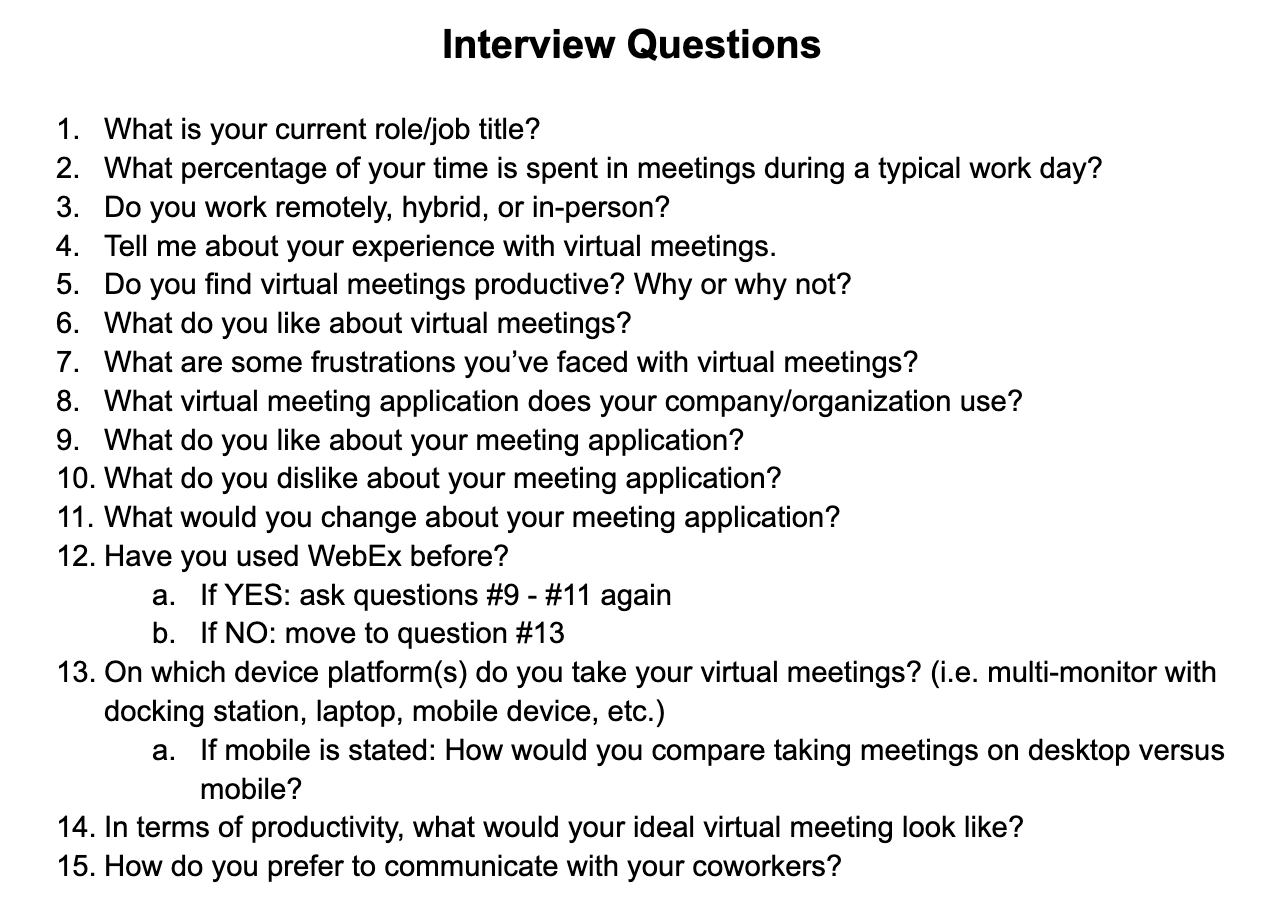
I co-authored a 10-question survey which we distributed to participants and I also co-authored the script for one-on-one interviews. By the end of the research window, we collected 23 survey responses and conducted nine one-on-one interviews.
Research Methods:
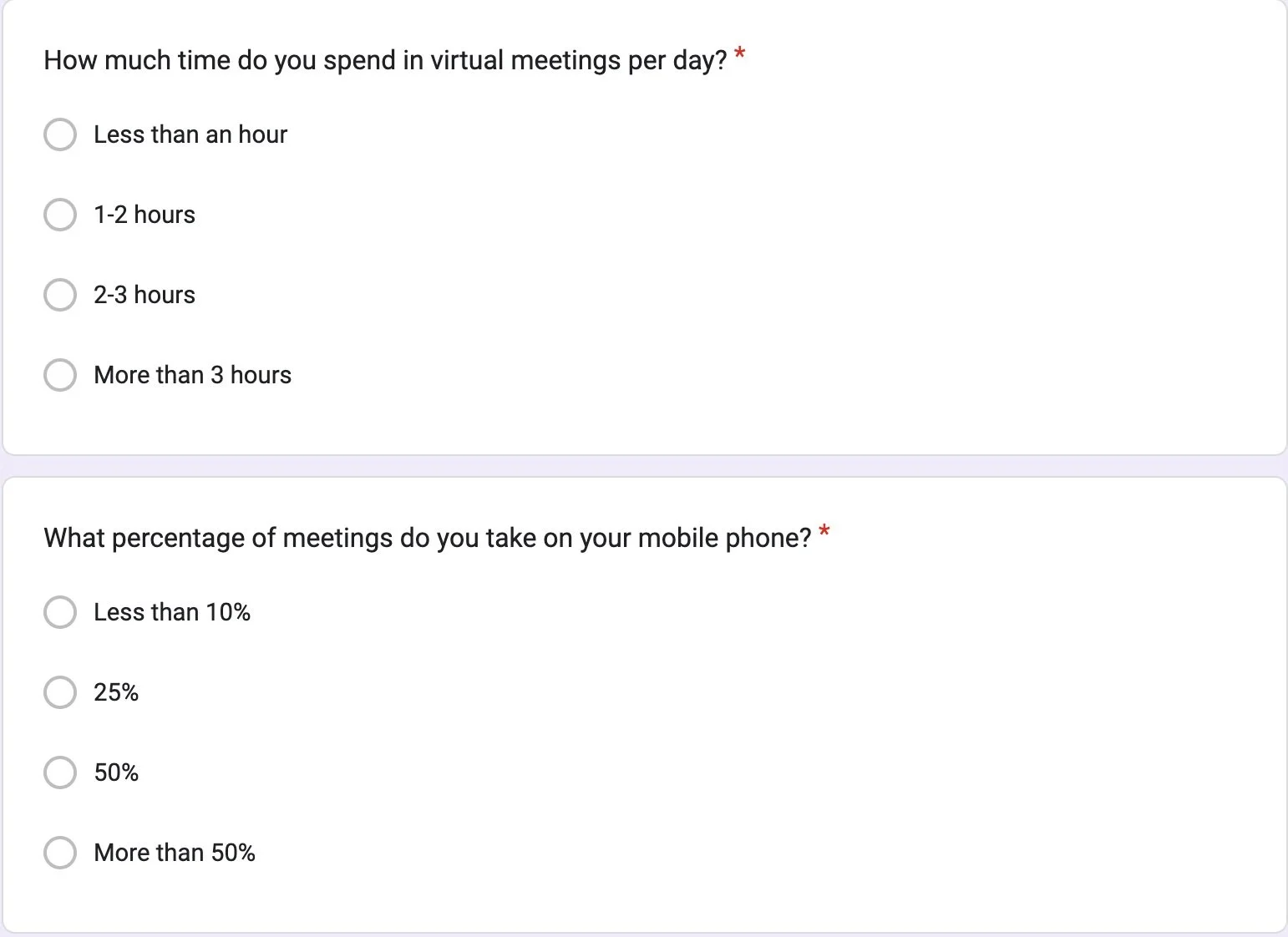
Snippet of the survey questions
“70% of my meetings aren’t productive“
“They’re kind of painful“
Questions for the 1-on-1 interviews
Research Insights:
Early analysis revealed consistent frustration with meeting effectiveness and fatigue:
“It’s so difficult to have back-to-back meetings for large chunks of your day. You’re never fully prepared. It leaves you drained even if you have a small break.“
Synthesizing the research revealed four key insights about how users experience virtual meetings.
What Worked Well:
Interactive features supported engagement:
Participants appreciated features like raising hands, polls, and Q&As, which encouraged participation during meetings.
Persistent chat enabled collaboration continuity:
Participants valued the chat for sharing links and documents before, during, and after meetings, creating a useful record of discussions.
Pain Points:
Meetings last too long:
Nearly all participants expressed a preference for meetings lasting 30 minutes or less, often citing attention fatigue during longer sessions. Meetings were frequently perceived as redundant when conversations lost focus or revisited previously covered information.
Lack of structure reduced meeting effectiveness:
Participants emphasized the value of clear agendas to guide discussions, keep participants aligned, and enable shorter, more focused meetings.
Solution:
Insights from user research pointed to a consistent lack of structure as a key driver of ineffective meetings. Participants described conversations that drifted off topic, rushed decisions, and unclear outcomes- often resulting in additional meetings later on.
To address this, we decided to introduce an agenda feature within Webex to help teams align on goals, guide discussions, and support clearer outcomes during meetings.
Early Concepts:
I explored multiple early concepts to understand how an agenda feature could integrate into the live meeting experience.
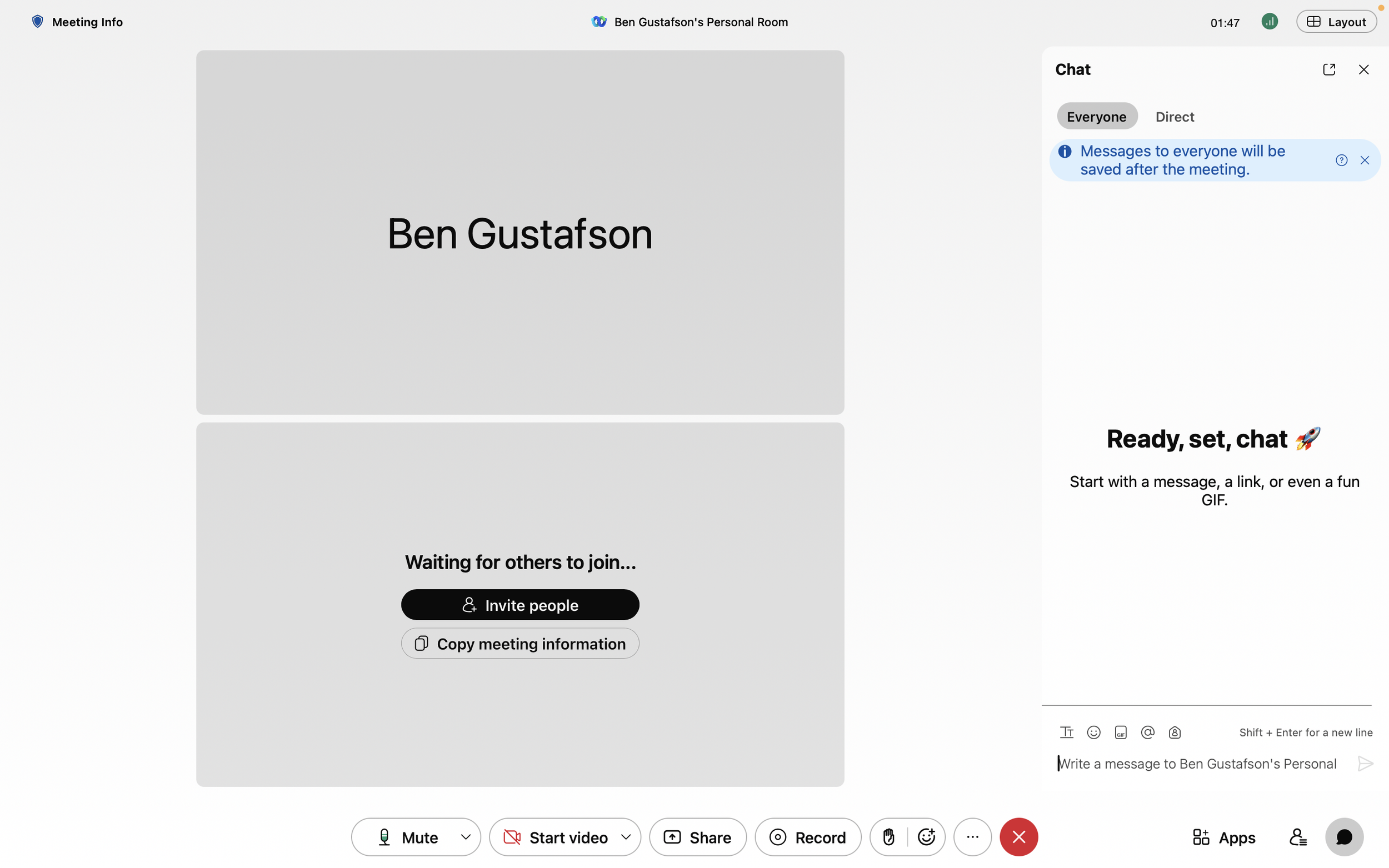
Current Webex meeting layout with the right-side chat panel open- highlighting the limited space for additional meeting tools.
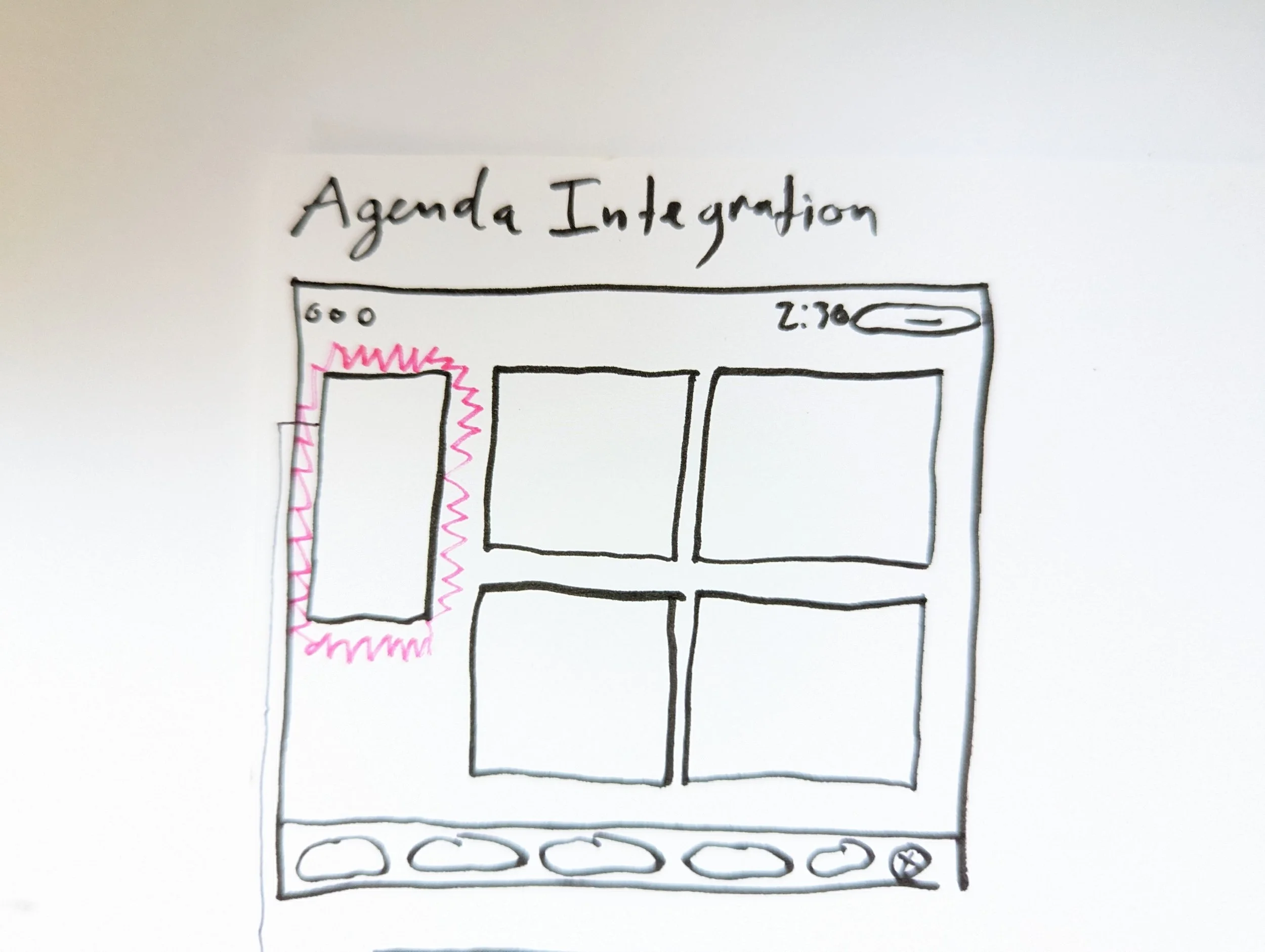
Early concept exploring how the unused left-side space could accommodate an agenda pane without disrupting the meeting layout.
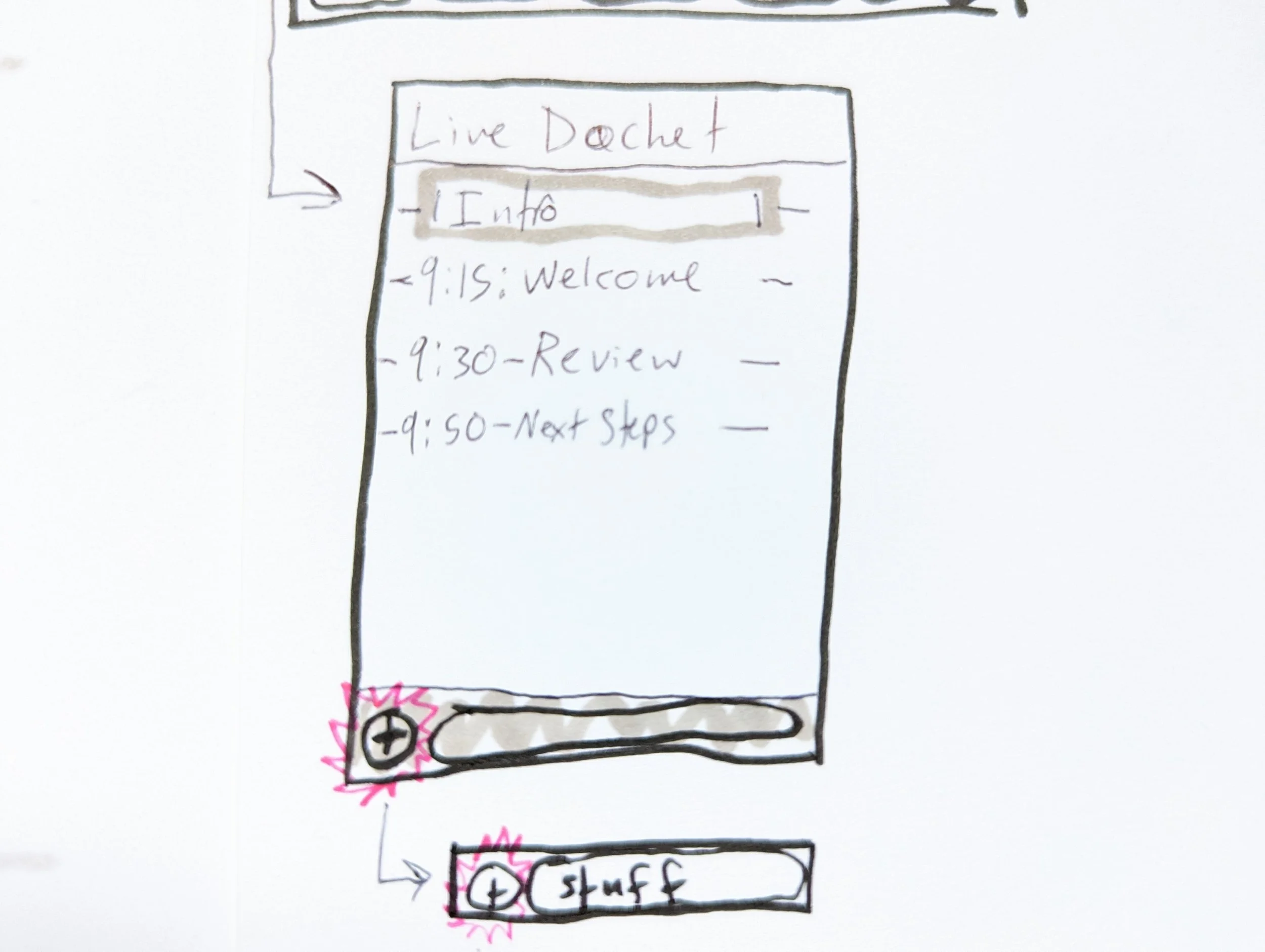
Concept sketch exploring an agenda panel with structured topics, time markers, and a method to add discussion items in real time.
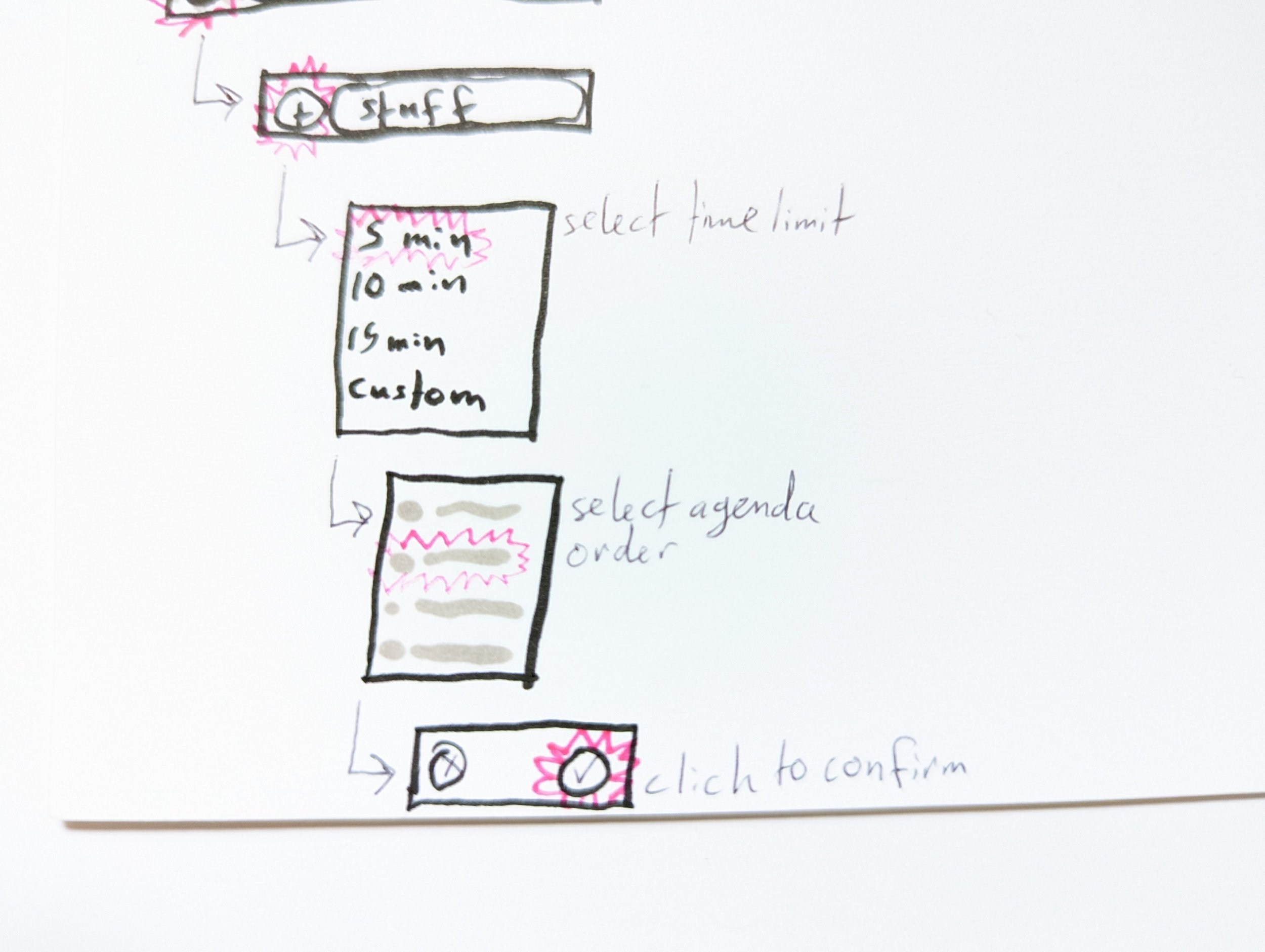
Workflow concept sketch exploring how participants could add, sequence, and confirm agenda topics in real time.
First Ideation:
The meeting experience spans three key phases: before, during, and after a meeting. Our solution needed to support each stage within Webex’s existing workflows.
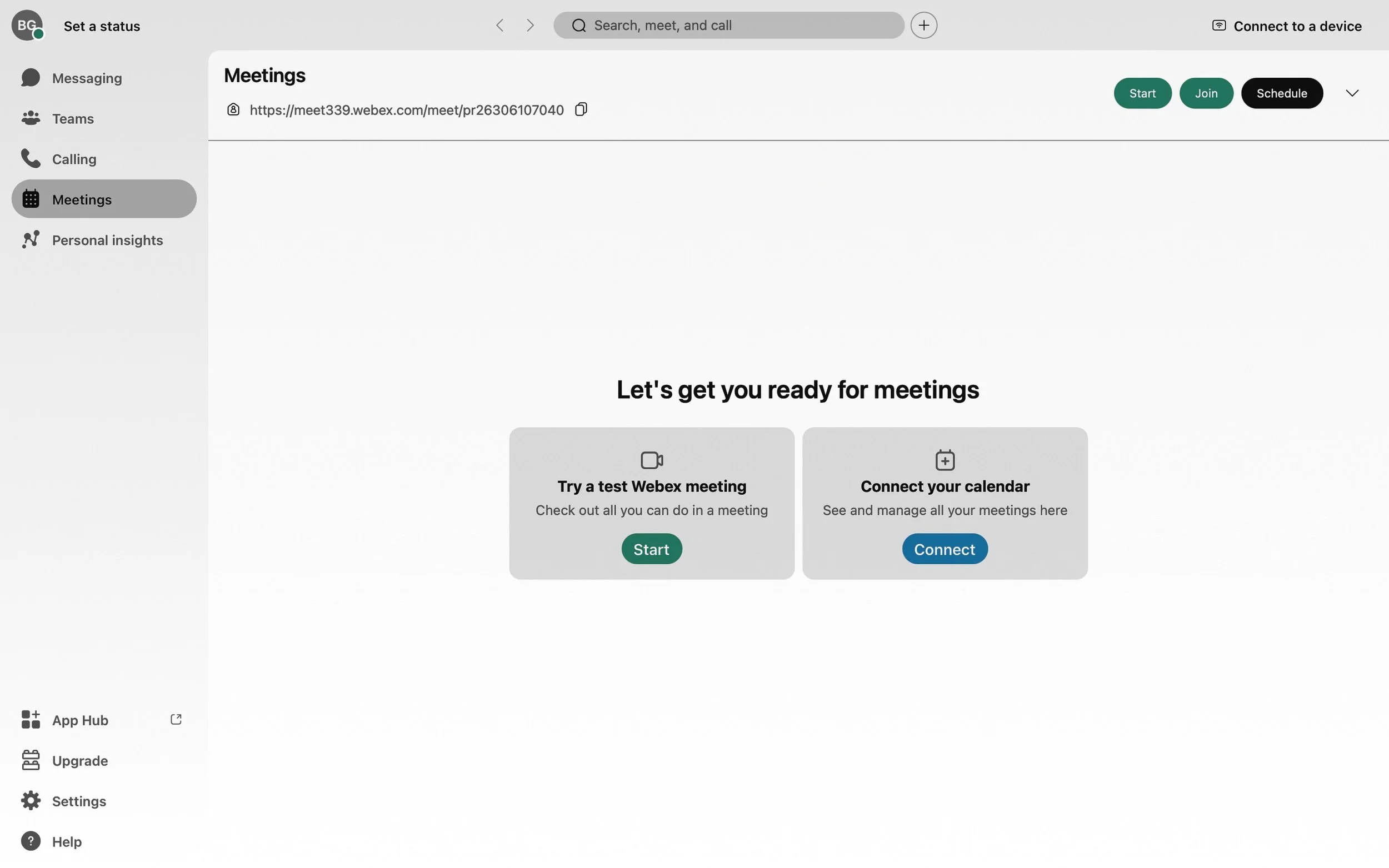
Because scheduling a meeting already followed an established flow, determining where the agenda feature should live became a critical design decision. We identified two logical entry points, beginning with the left-side navigation in the Webex home dashboard- shown below.
Before
Existing navigation used to access meetings.
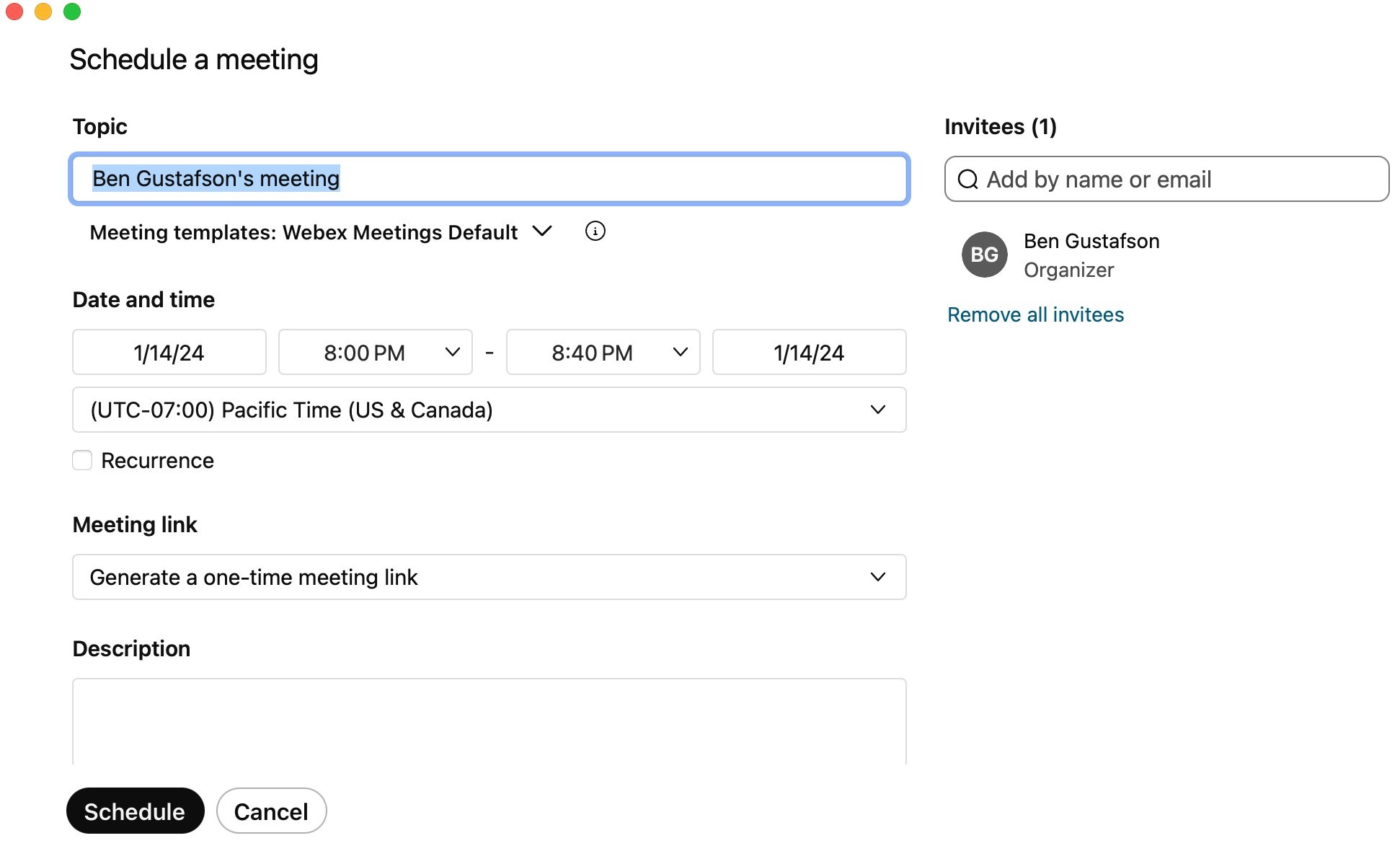
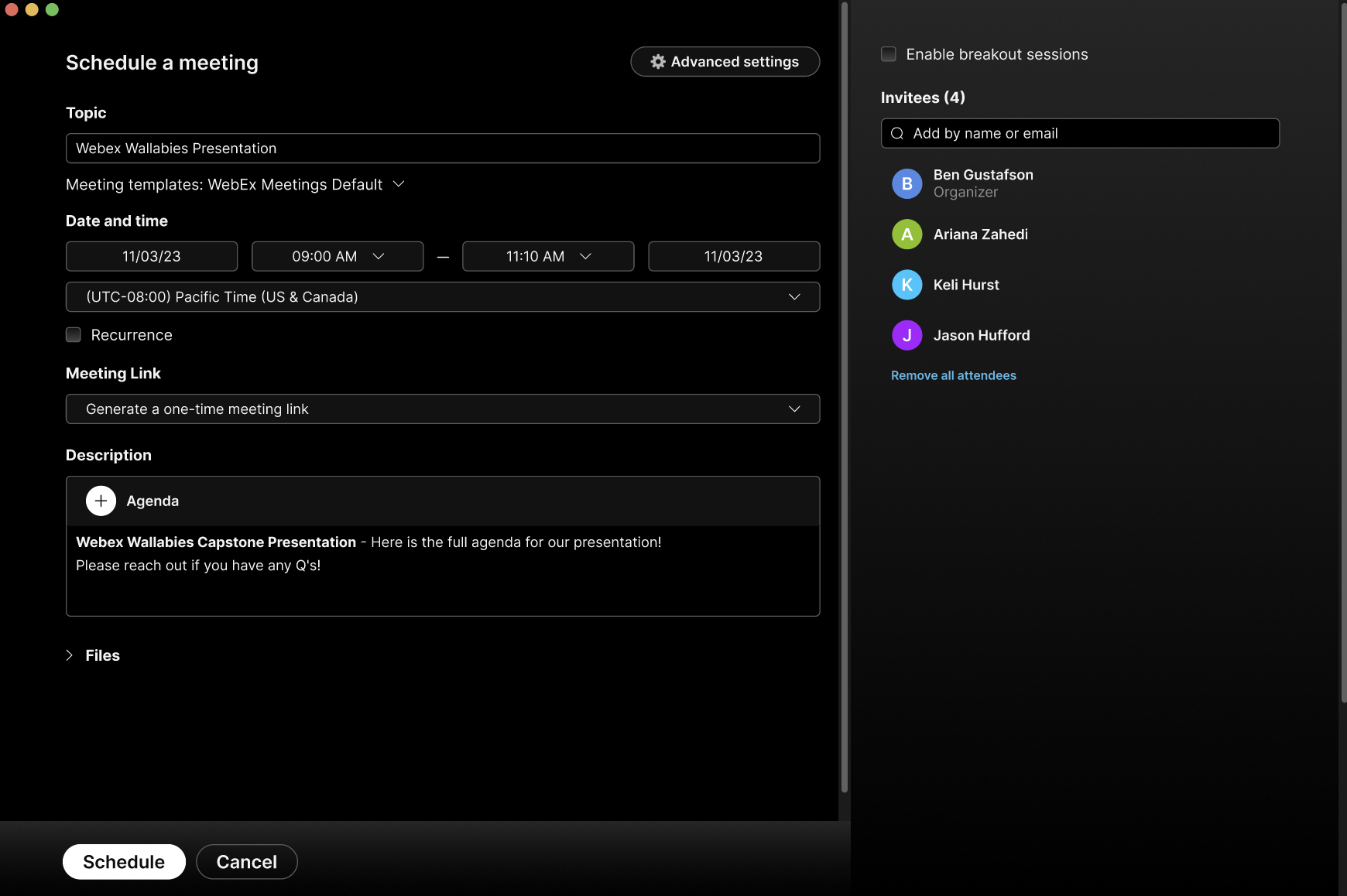
A second entry point integrated the agenda feature into Webex’s scheduling modal, where users already defined meeting details.
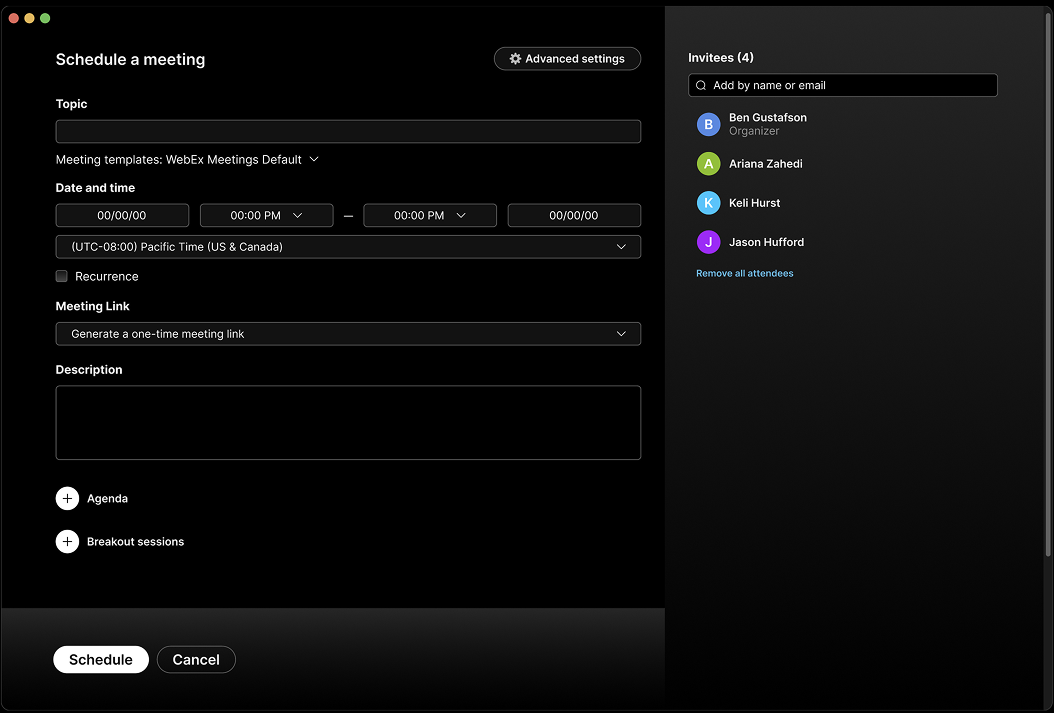
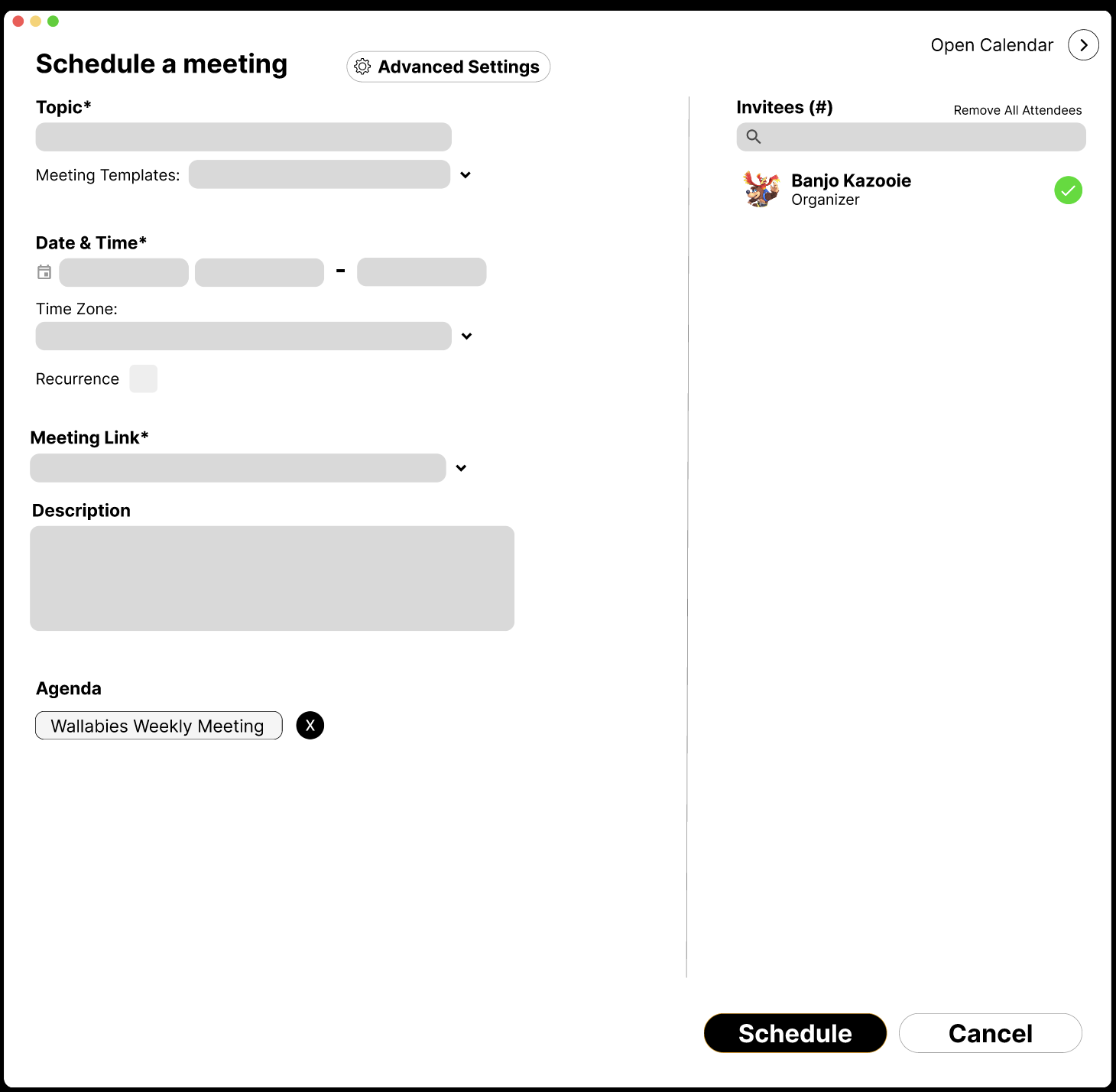
Existing Webex scheduling modal used to define meeting details.
Pre-Meeting:
To define the pre-meeting experience, I mapped how users create and attach agendas before a meeting begins.
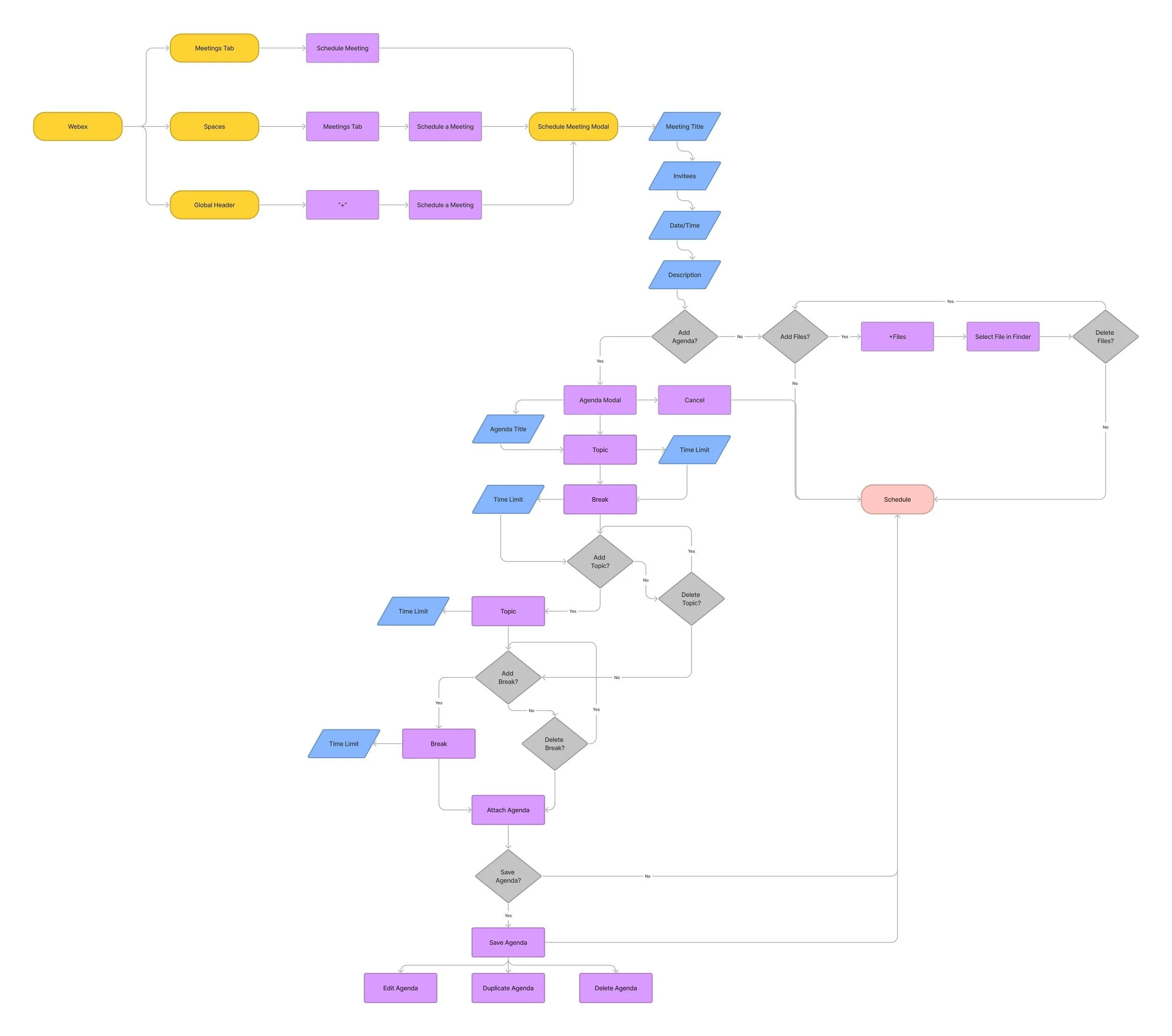
End-to-end journey map outlining agenda creation, editing, and attachment flows.
Here are lo-fi wireframes exploring how users create and attach agendas before meetings.
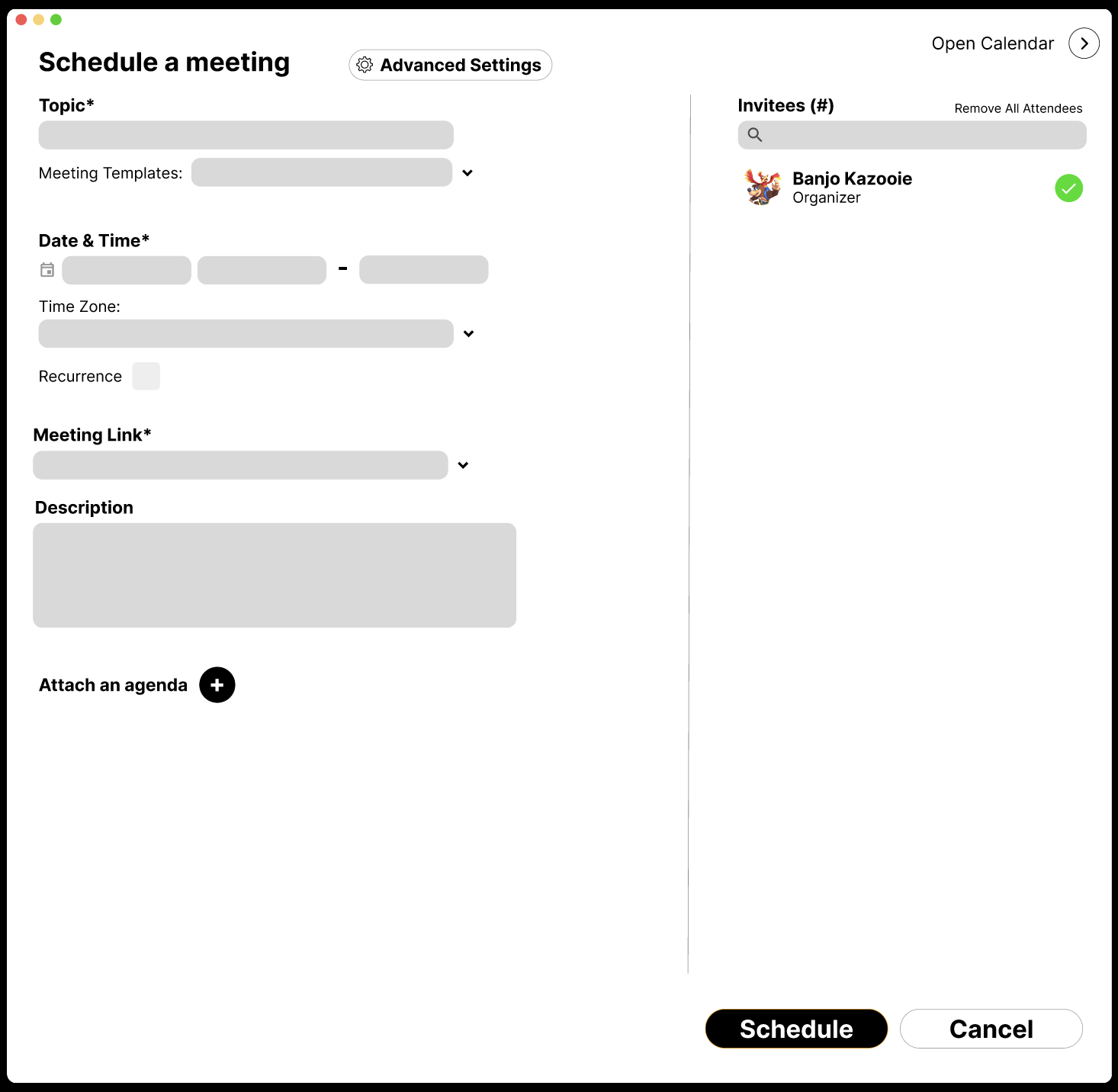
Step One: Users began agenda creation by selecting “Attach an agenda.”
Meeting timer
Agenda topics
Files pane
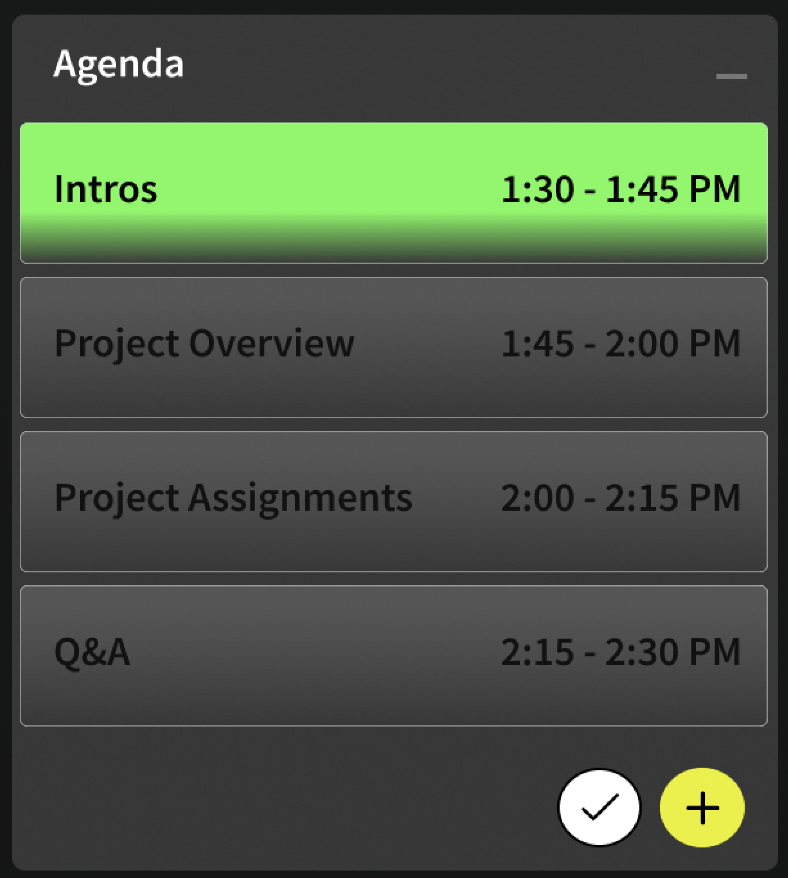
To help users track discussion progress and recognize completed topics, I introduced a color-coding system within the agenda pane.
After
Current agenda topic is highlighted in green.

Attached files.
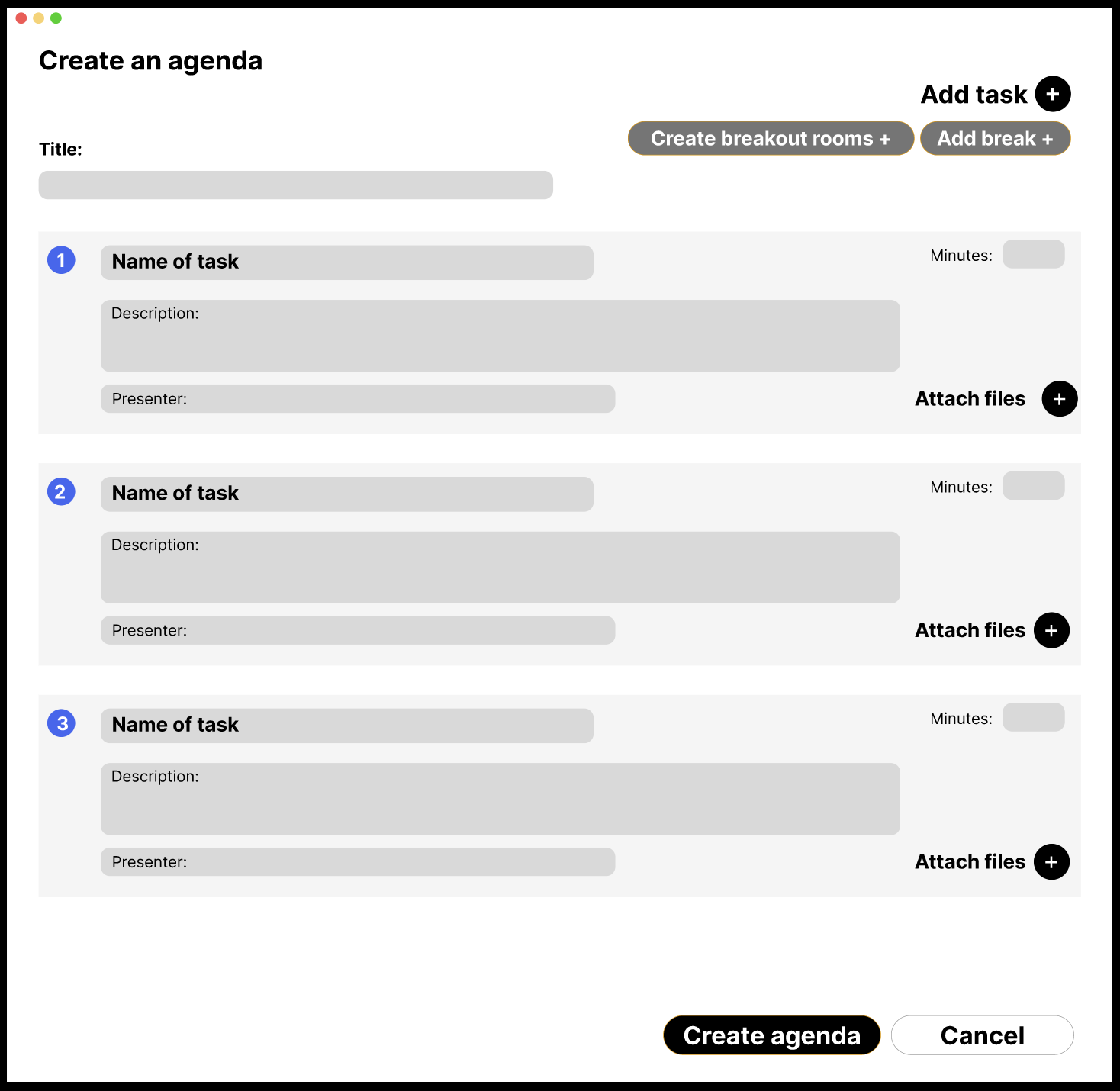
Step Two: Users added agenda topics, attached files, and structured breaks within the schedule.
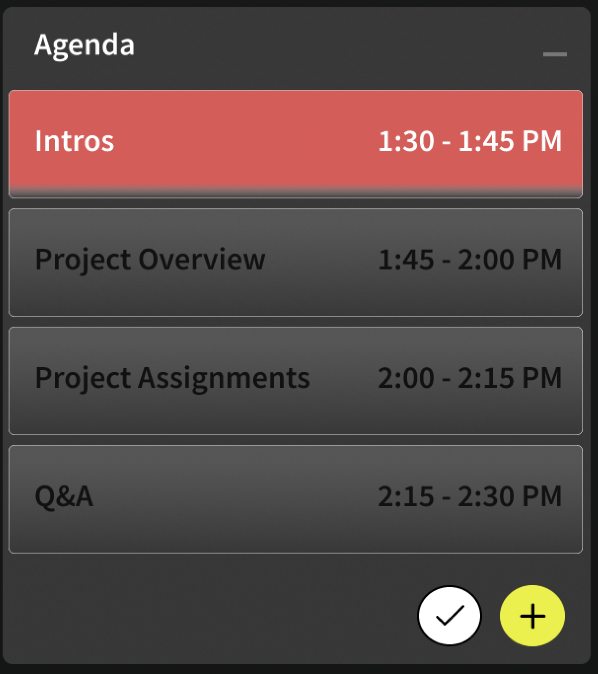
Two minutes before a topic ends, the highlight changes from green to red, signaling participants to begin wrapping up the discussion.
Post-Meeting:
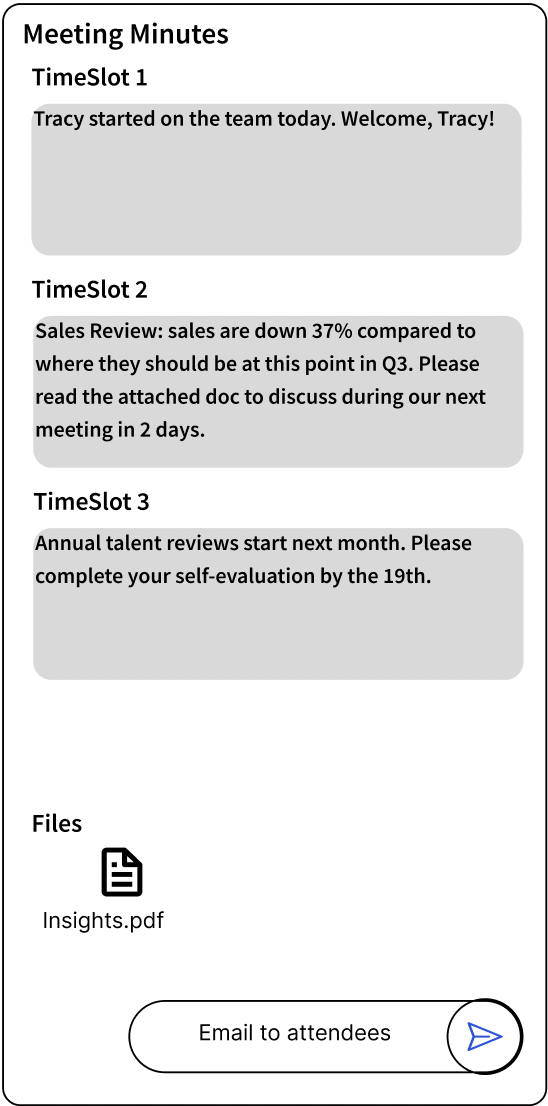
To extend the meeting experience beyond the call, I explored a “Meeting Minutes“ concept that summarizes discussion notes and shared files, then emails them to attendees afterward.
A dedicated “Agendas“ entry created a clearer starting point.
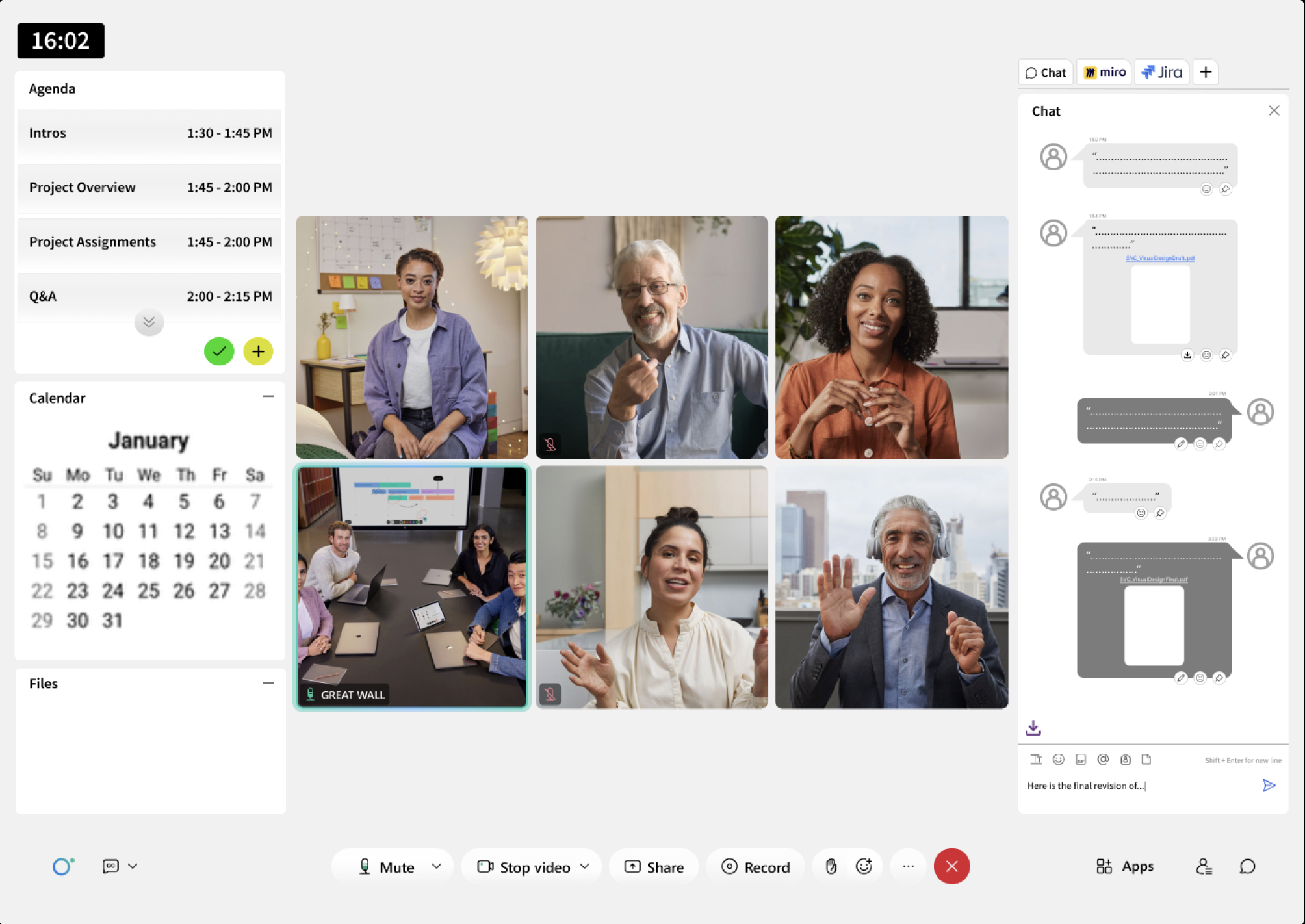
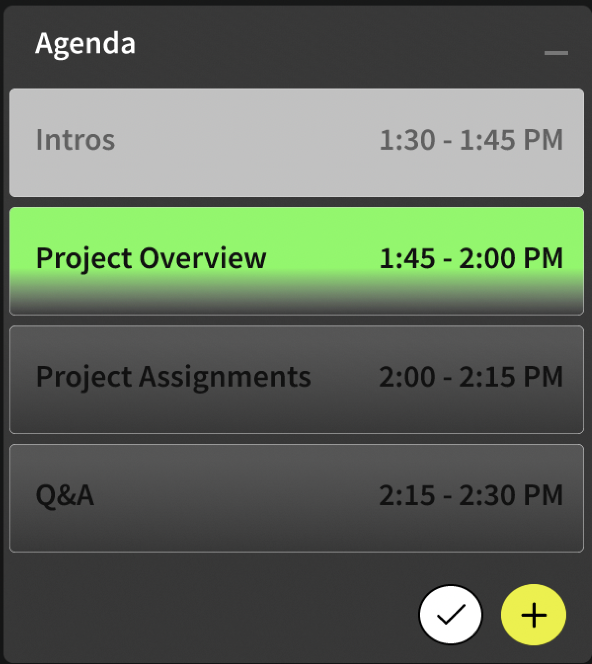
Completed topics are shaded light gray to indicate discussion has finished. The active topic is highlighted in green.
This reduced ambiguity about meeting progress and helped teams stay aligned without verbal coordination.
Notes captured by topic.
Send summary to all attendees.
This concept aimed to reduce post-meeting follow-up tasks and ensure shared understanding persisted after the meeting ended.
Step Three: The completed agenda appears attached to the meeting.
In-Meeting:
This lo-fi wireframe explores the in-meeting experience, where the agenda created earlier becomes the central meeting interface. Attached files also surface here for real-time reference. Key interface areas are highlighted below.
Calendar
Mid-point Check In:
Six weeks into the project, I scheduled a stakeholder check-in to review our user journey and lo-fi prototype.
After a 20-minute walkthrough, our stakeholders shared positive initial feedback alongside constructive critiques that helped refine our direction.
Pros:
Scale: Stakeholders appreciated the ambition of the agenda initiative, describing it as a “big idea“ with meaningful potential impact.
Breaks: The ability to incorporate breaks directly into an agenda was positively received.
Color Coding: Stakeholders praised the color-coding system for clearly indicating discussion progression.
Cons:
Dual Entry Points: Stakeholders found the separate agenda entry in the left navigation confusing. They expected agenda creation to exist as part of scheduling a meeting rather than a standalone action.
Post-Meeting: The Meeting Minutes concept was viewed as overlapping with existing Webex functionality, suggesting the opportunity lay more in enhancing current workflows rather than introducing a separate feature.
This feedback helped narrow the feature scope and reinforced integrating agendas more tightly within existing meeting workflows.
Second Ideation:
After presenting our initial concept, stakeholder feedback revealed opportunities to better align the agenda feature with existing Webex workflows. We revisited the design to incorporate this input and refine the experience.
Dual Entry Points:
Stakeholders viewed agenda creation as a step within scheduling rather than a standalone task. In response, we removed the left-navigation entry point and positioned agendas as part of the meeting scheduling flow.
Before

After
Post-Meeting:
During exploration, we discovered Webex already offered an AI-powered feature that automatically shares meeting transcripts, chat messages, and shared links with attendees. After validating this capability, I recommended discontinuing further work on the post-meeting concept and refocusing efforts on areas where we could deliver greater impact.
Hi-fi Prototype:
Following the mid-point stakeholder check-in, we prepared for usability testing by developing a hi-fi prototype. While the in-meeting experience remained unchanged, we focused on refining the pre-meeting agenda creation and scheduling flow.
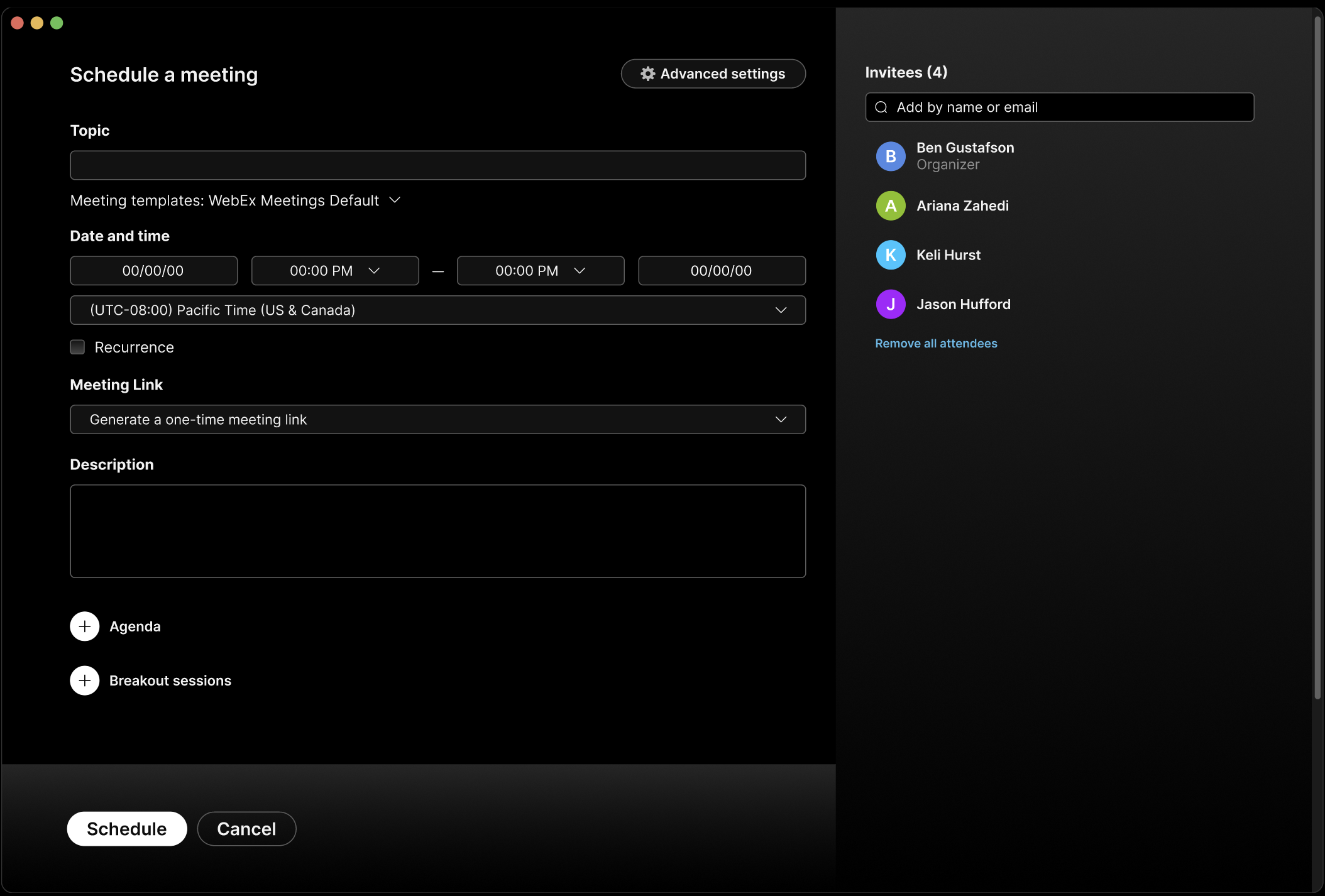
Step 1: Select "Agenda" in the scheduling modal to begin creating an agenda.
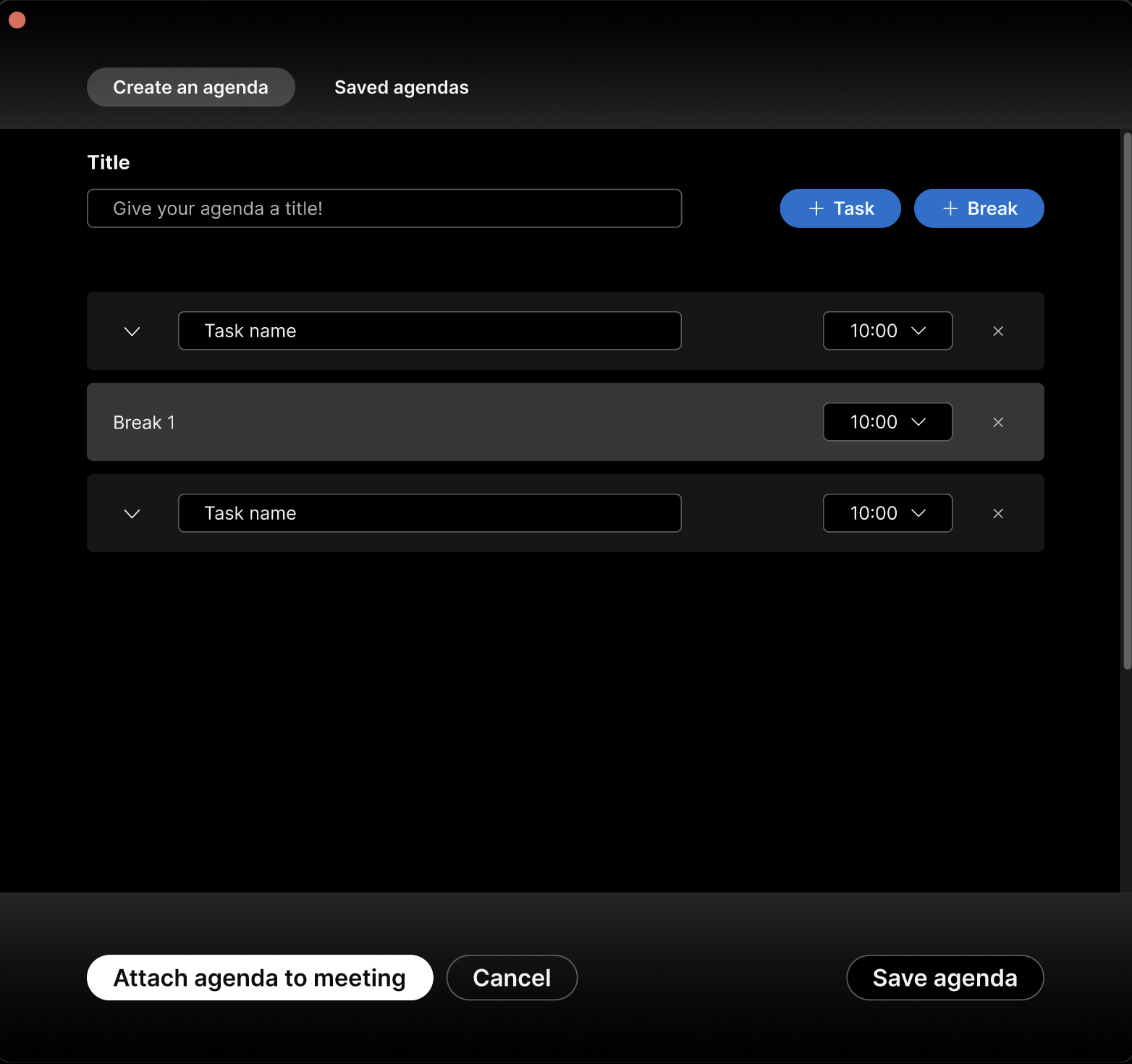
Step 2: Users build and organize their agenda by adding topics, breaks, and time allotments.
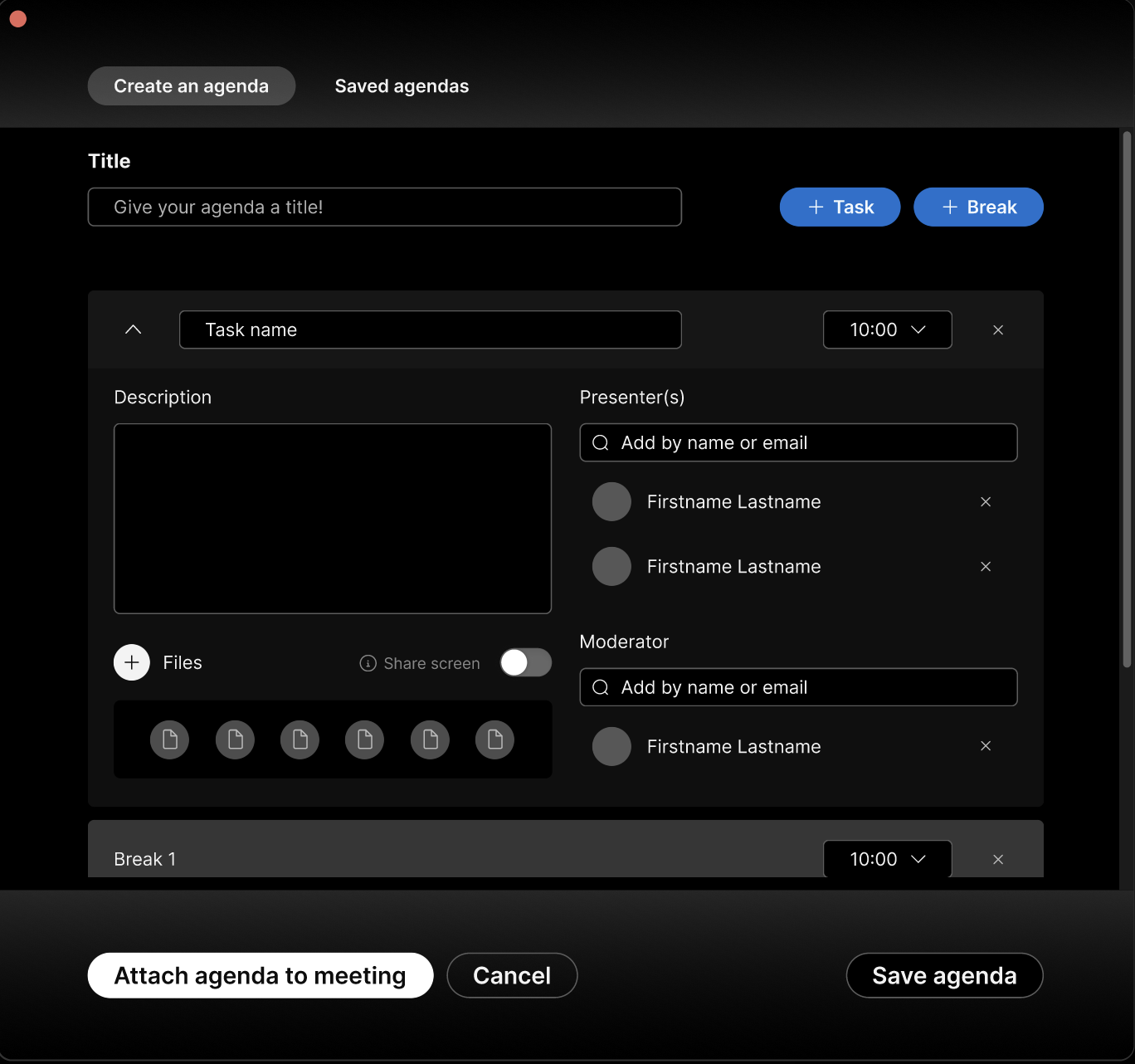
Step 3: Users expand topics to add details, assign presenters, attach files, and save agendas for reuse later, then select "Attach agenda to meeting" to include it in the meeting invite.
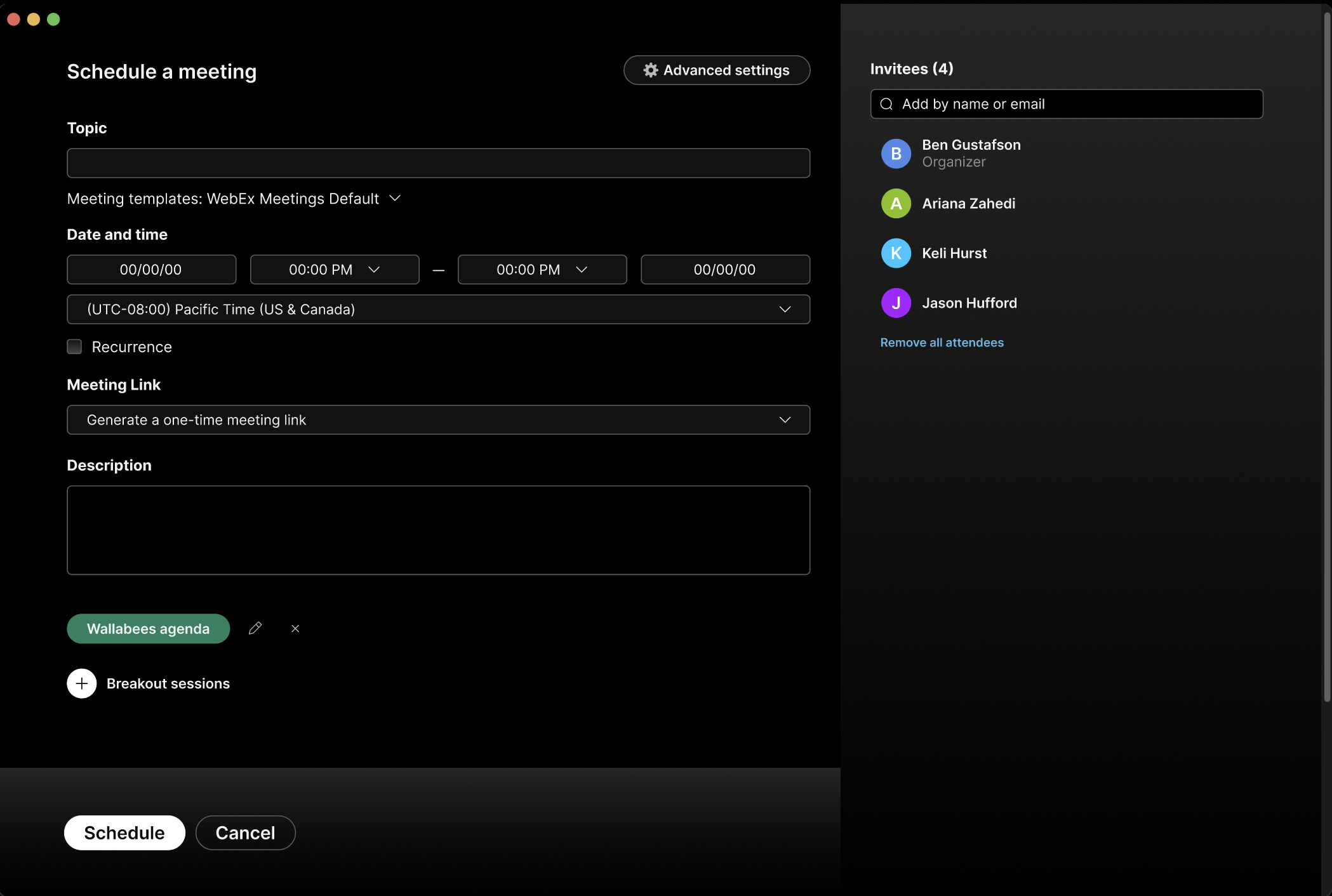
Step 4: Users return to the scheduling modal with confirmation that the agenda has been successfully attached.
Usability Testing:
We conducted usability testing over three days. I created the testing plan and questions, with three team members (including myself) each running two 30-minute sessions. We evaluated both the pre-meeting and in-meeting experiences, along with overall usability across the journey. After synthesizing the results, we identified the following insights:
Pre-Meeting Testing Results:
Users preferred scheduling meetings directly through the calendar- aligning with familiar patterns from tools like Outlook, for example.
Users struggled to locate where files could be attached to an agenda.
The 10-minute time increments felt too rigid- users wanted smaller intervals and manual input.
In-Meeting Testing Results:
The color-coding system was very well received, but participants were unclear about what each color represented.
The testing insights directly informed our final phase of ideation, where we prioritized improvements to clarity discoverability, and workflow alignment.
Final Design Decisions:
Incorporating user feedback, we iterated on the design one final time to refine and finalize the experience. These refinements focused on reducing friction before meetings and improving clarity during live discussions.
Pre-Meeting Solutions:
Calendar Entry Point: We introduced a calendar-based entry point- allowing users to schedule meetings directly from the calendar view.
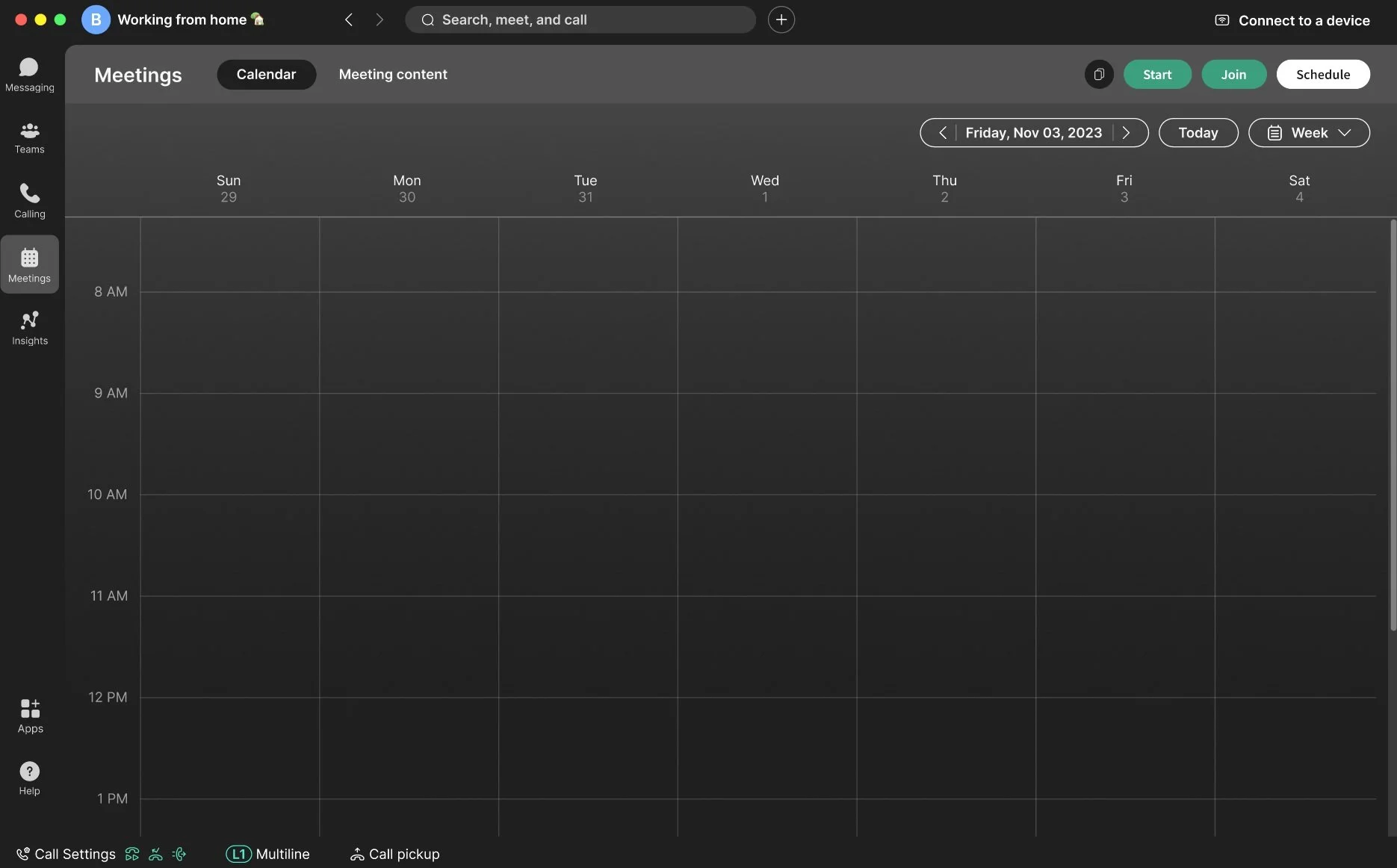
Step One: Selecting a date in the calendar begins meeting scheduling.
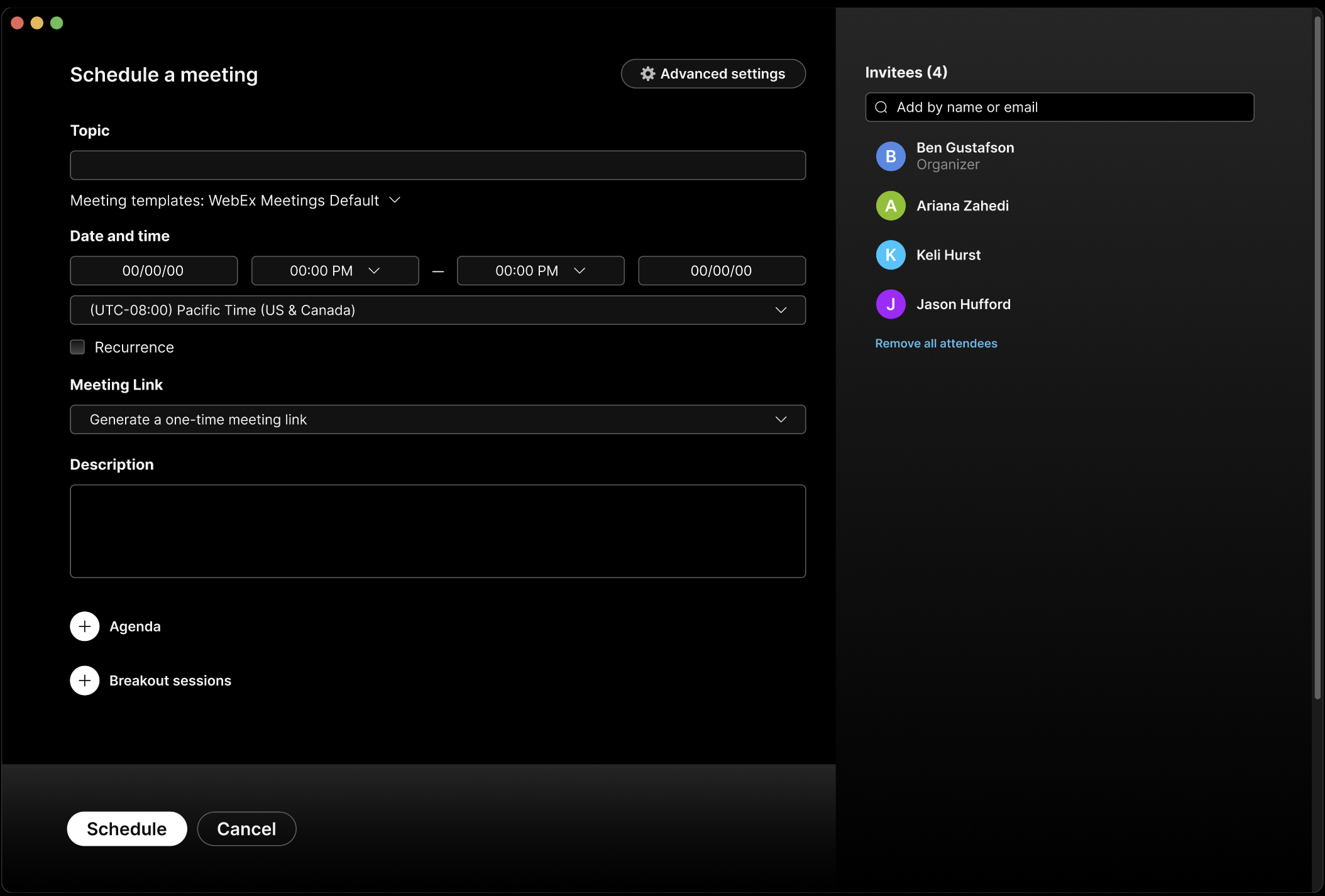
Step Two: The scheduling modal opens, where meeting details and agendas are configured.
Centralized File Attachments: I moved file attachments to the main scheduling modal to improve discoverability.
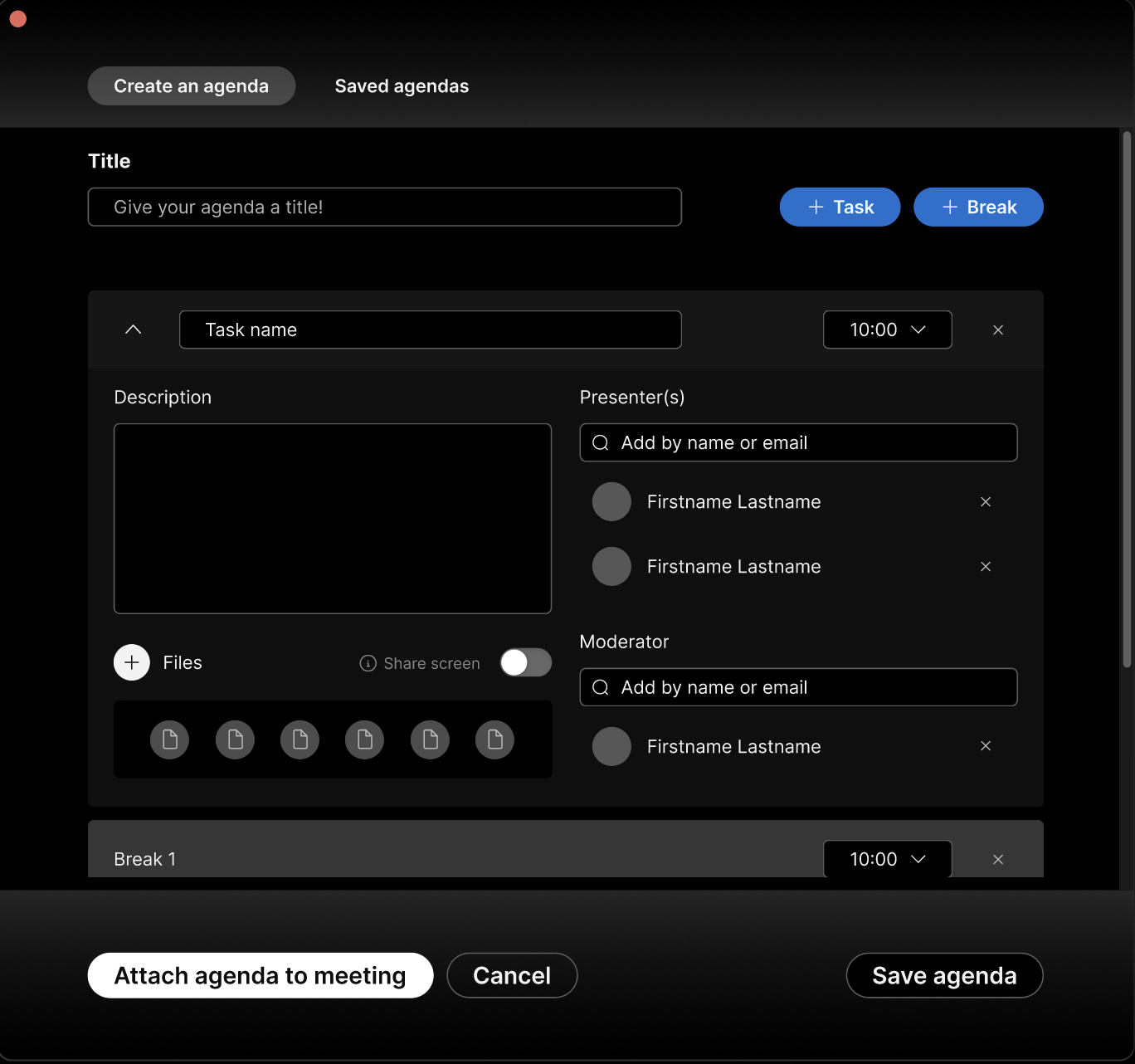
Before: File attachments were hidden inside individual agenda topics.
After: File attachments were moved to the main scheduling modal for easier discovery.
Flexible Time Increments: We reduced time intervals to five minutes and added manual entry for greater scheduling flexibility.
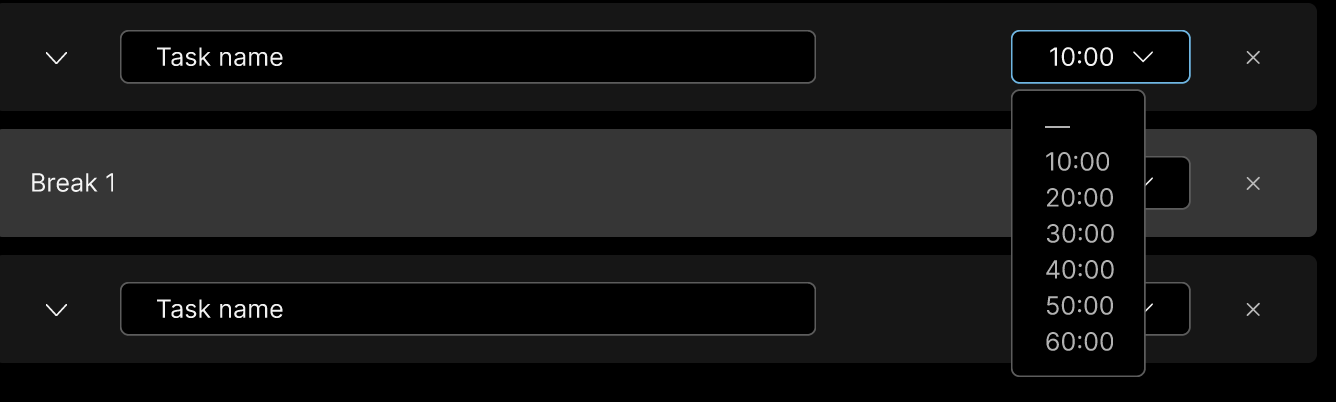
Before: Time selection was limited to 10-minute increments.
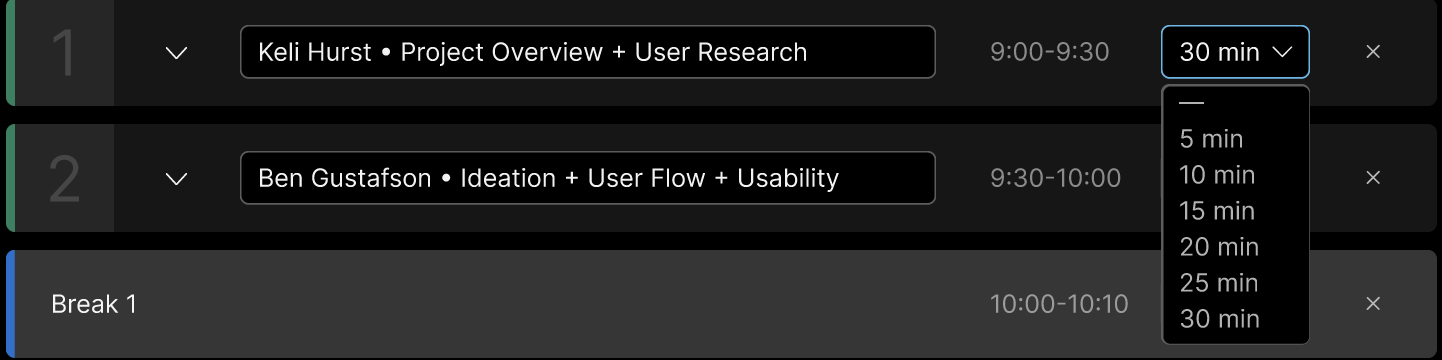
After: Users can now select 5-minute increments or enter custom durations.
In-Meeting Solutions:
Color System Clarity: Inspired by traffic light conventions, I refined the agenda’s color system: green still indicates active discussion, the warning state signaling wrap-up shifts to yellow, and additional visual cues were added to make discussion status easily recognizable at a glance.
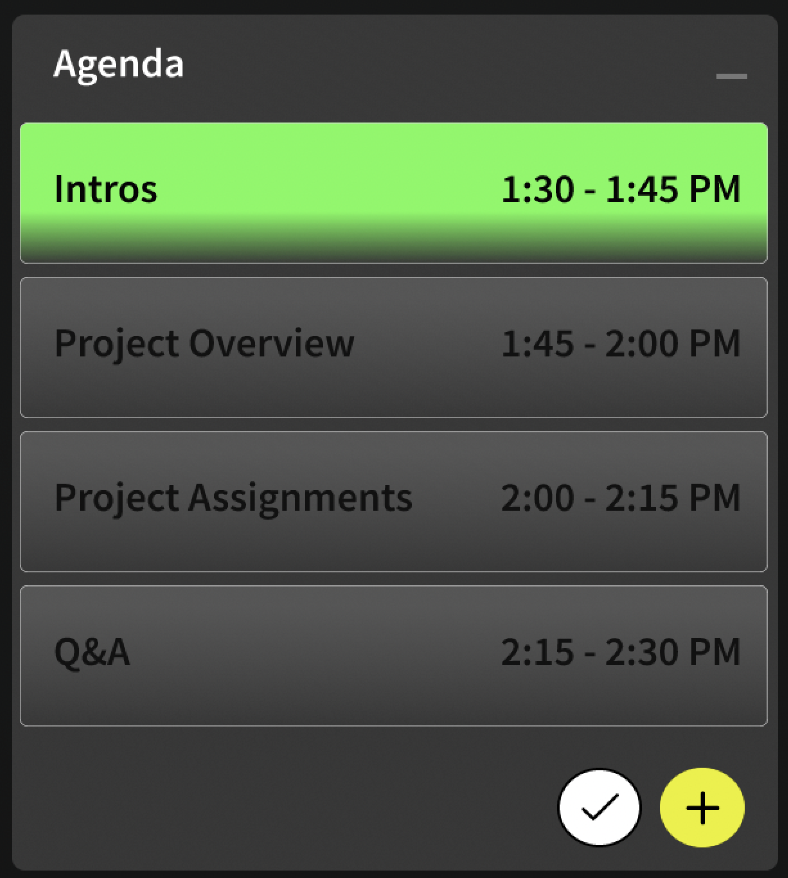
Before: Current discussion shown only through a green highlight.
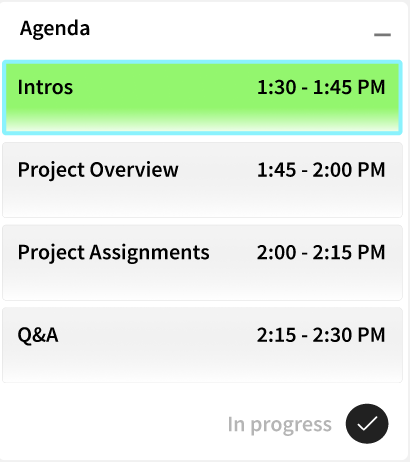
After: Added an outline and "In progress" indicator to clarify the active topic.
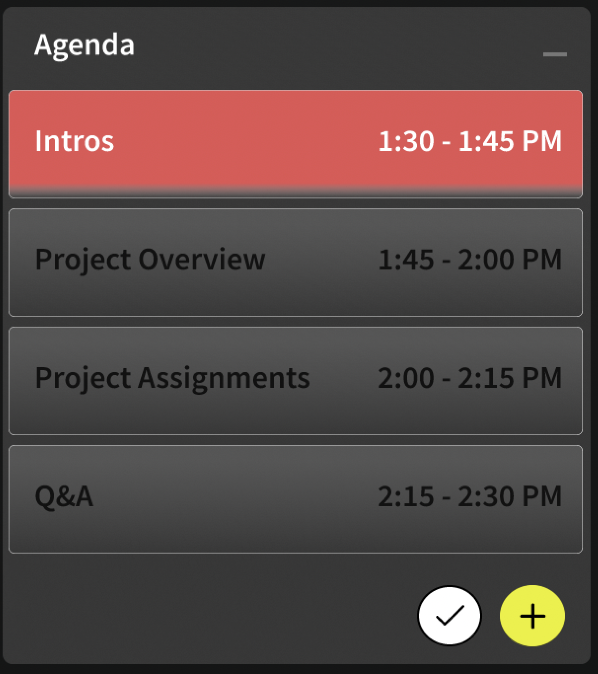
Before: Topic turns red when nearing its' end time.
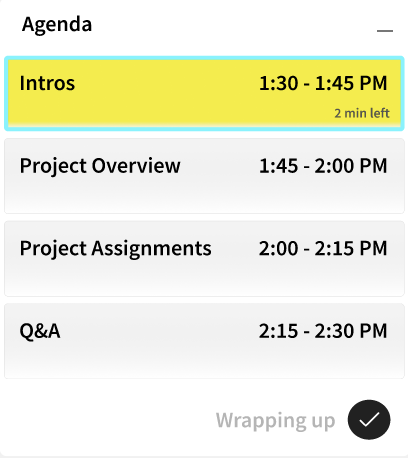
After: Warning state refined- color shifts to yellow, adds "2 min left", and updates status to Wrapping up.
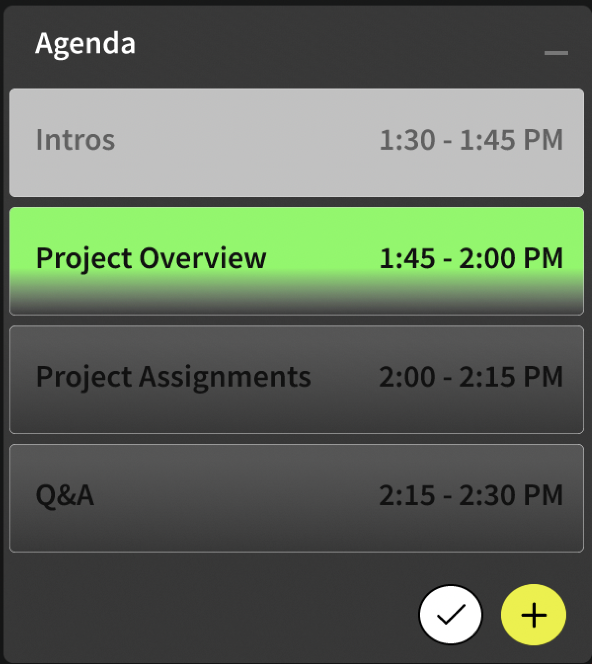
Before: Completed and current topics appear visually similar.
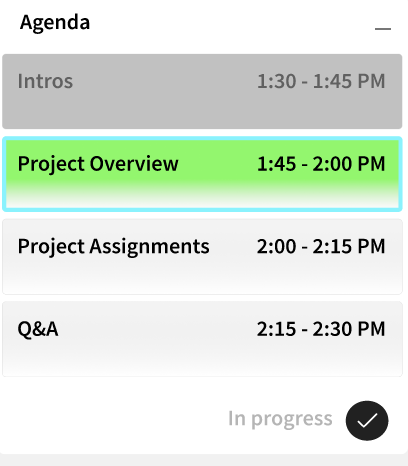
After: Completed topics are subdued, while the active discussion remains clearly highlighted.
Impact:
My team presented the final concept in week ten to our two primary stakeholders (the UX Manager and Sr. UX Designer), along with three Sr. UX Researchers. The concept was well-received, with stakeholders highlighting the clarity of the user focus and the strength of the in-meeting experience refinements. Key qualitative feedback included:
“We haven’t really considered this type of user before.”
“The iteration on the in-meeting experience is strong.”
“You did a great job narrowing scope to focus on what matters most for users.”
Reflections:
Looking back on this project, a few key lessons stood out:
User Data Drives Alignment: When disagreements arose around design decisions, grounding discussions in user needs and research data helped unblock progress and build team consensus.
Align Early On Ways of Working: Our collaboration was strong, but establishing shared workflows earlier (version control, organization, and workspace hygiene) would have improved efficiency.
Increase Stakeholder Touchpoints: The project reinforced how recurring touchpoints help teams validate decisions early and maintain momentum toward a shared vision.
Future Concepts:
We explored a few additional concepts to extend the pre-meeting and in-meeting experience. These ideas highlight future opportunities to augment collaboration and productivity workflows within Webex.
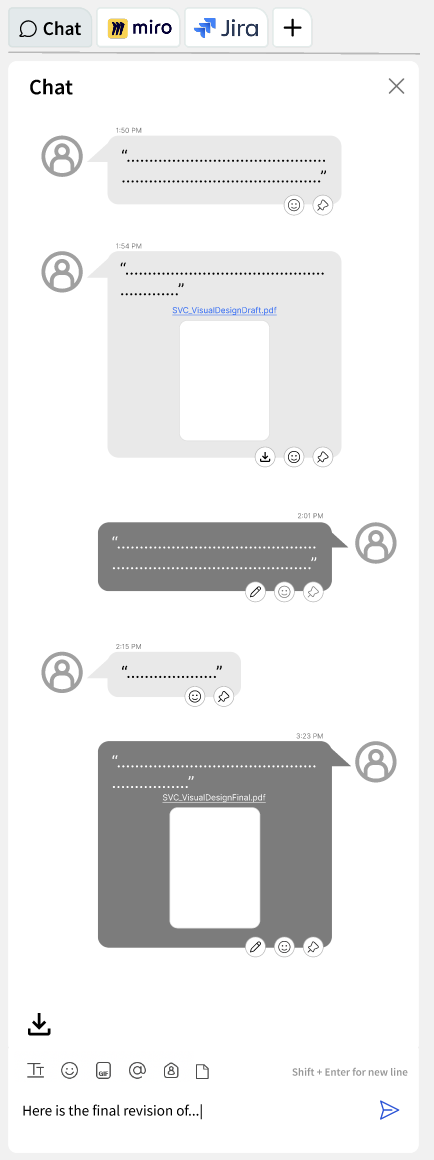
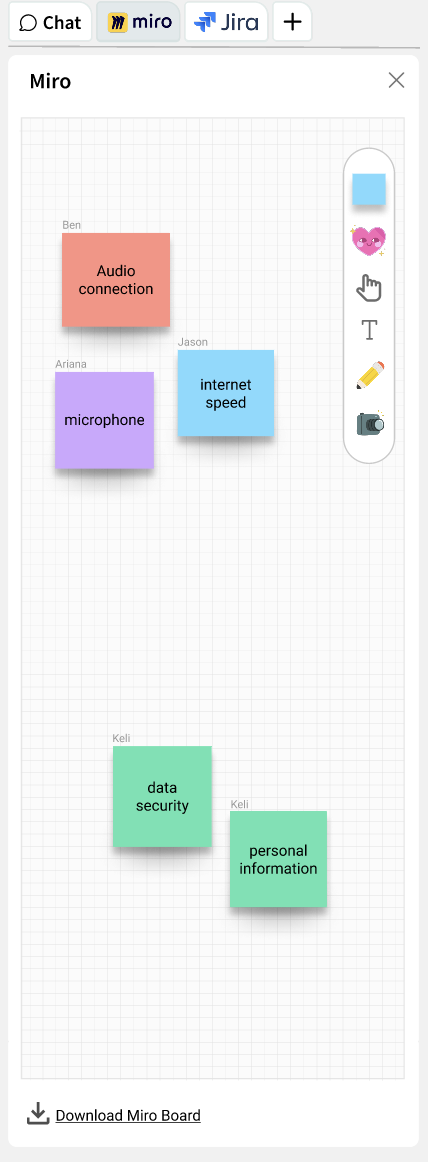
Productivity Tabs:
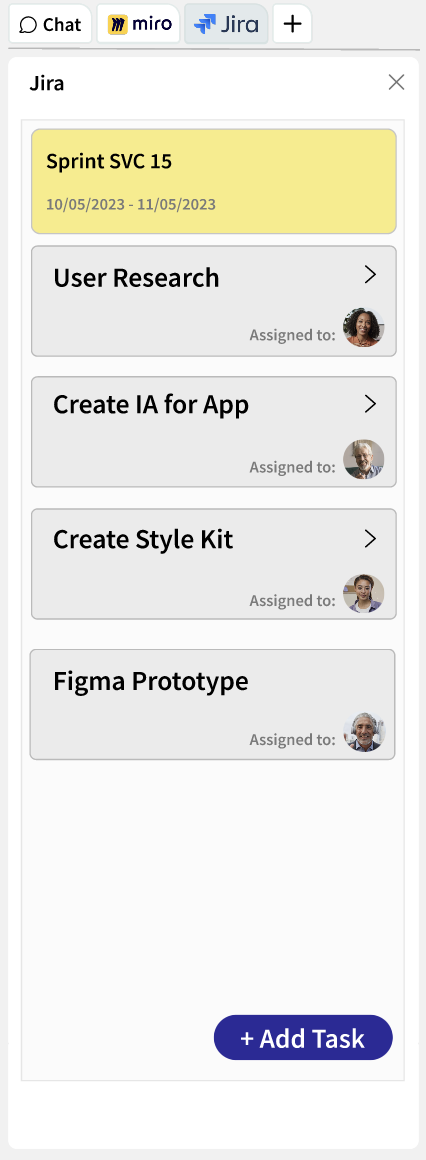
I added productivity tabs to the right-side panel- allowing users to switch between the chat and integrated tools, such as Miro and Jira, without leaving the meeting.
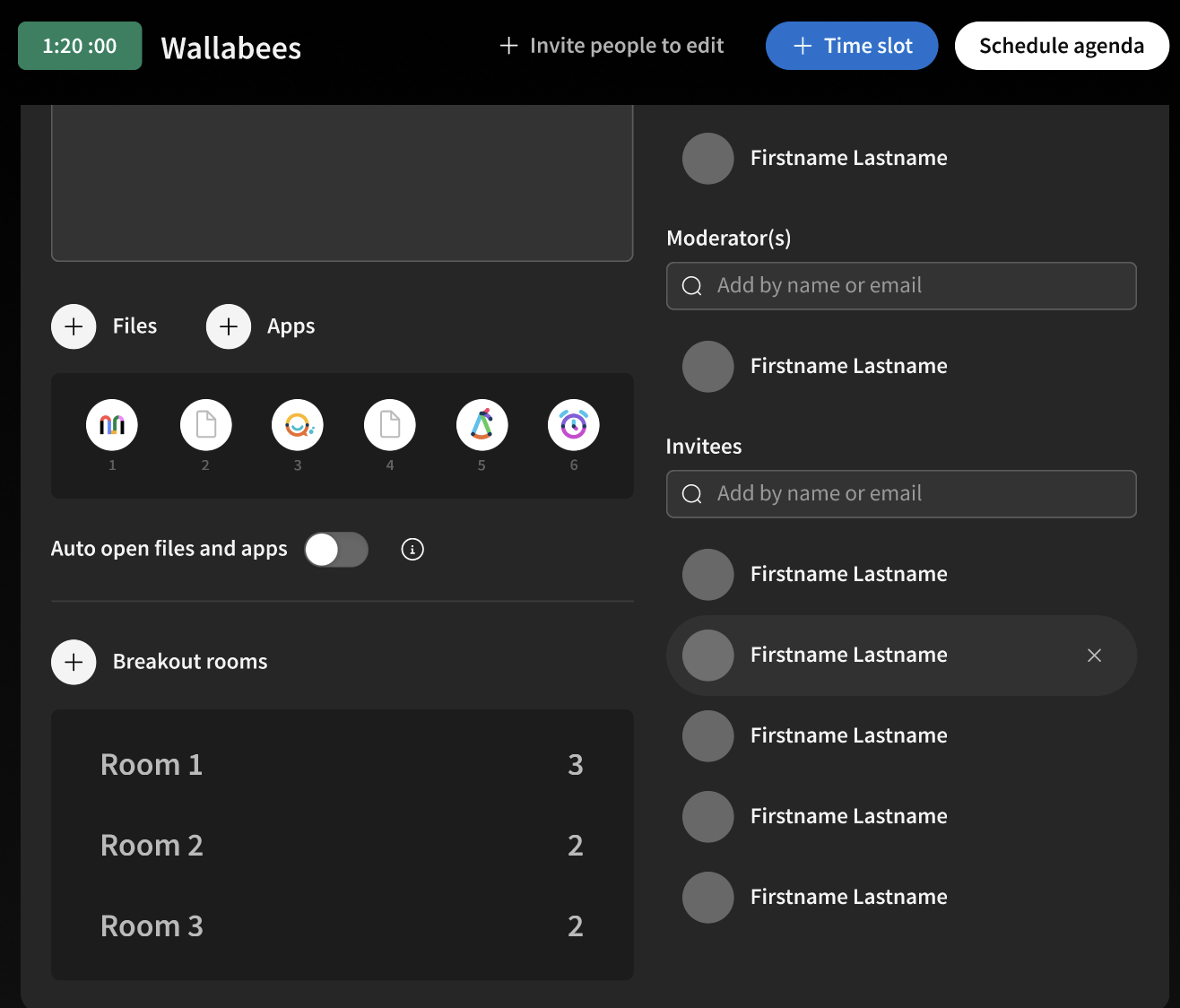
CTA to add breakout rooms
Asynchronous Joining + Breakout Rooms
We explored concepts for configuring breakout rooms during agenda creation and enabling asynchronous joining- allowing attendees to participate only on topics relevant to them. These ideas were deprioritized to maintain focus on core meeting workflows, but represent opportunities for future expansion.
Asynchronous joining- adding attendees for specific topics if they don’t need to attend the whole meeting.
Together, these explorations reinforced a broader opportunity: evolving meetings from passive conversations into structured, adaptable collaboration experiences.